Modern computers are programmable, meaning the specific things they do can be changed freely and are not defined by the machine designer. The set of things a computer is asked to do is called a program.
1 Instructions
A program consists of a sequence of instructions. Each instruction encodes one action to take and where to find any data that action might operate on.
Many instructions and handled by the ALU and compute arithmetic operations. They generally have four parts:
The operation to perform
The location of the first number to perform it on
The location of the second number to perform it on
The location to store the results.
These are encoded as binary numbers and put together into a single instruction.
Suppose we have 200 operations (requiring 8 bits to store them all), and have come up with a list of them with a number for each: 0 means add, 1 means subtract, 2 means multiply, 3 means divide, and so on.
Suppose we also have 32 possible operand locations (requiring 5 bits to store them all).
Then we can encode multiplying location 2 and location 5 and putting the result in location 11 as
Operation
Operand
Operand
Destination
00000010
00010
00101
01011
Another important class of instructions are conditional jumps. These are handled in the control unit and change which instruction will be executed next but changing the value stored in the program counter. Normally, the program counter is increased after each instruction to read the thing in memory after that instruction as the next instruction; but a conditional jump sometimes changes the program counter entirely. Conditional jumps allow us to express complicated and many-step tasks much more succinctly by encoding notions of repetition.
The following human-oriented instructions use both conditional and unconditional jumps.
Let be your age in years
Let be the number 0
If , jump to step 11
If is even, jump to step 8
Compute times and store it in
Compute plus and store it in
Compute plus and store it in
Compute divided by and store it in
Compute plus and store it in
Jump to step 3
Say My Collatz number is
Say the value of
Expand to see steps followed by a 20-year-old:
Step
Action
1
set
2
set
3
don’t jump ()
4
jump ( is even)
8
compute ; set
9
compute ; set
10
jump
3
don’t jump ()
4
jump ( is even)
8
compute ; set
9
compute ; set
10
jump
3
don’t jump ()
4
don’t jump ( is not even)
5
compute ; set
6
compute ; set
9
compute ; set
8
compute ; set
9
compute ; set
10
jump
3
don’t jump ()
4
jump ( is even)
8
compute ; set
9
compute ; set
10
jump
3
don’t jump ()
4
jump ( is even)
8
compute ; set
9
compute ; set
10
jump
3
don’t jump ()
4
jump ( is even)
8
compute ; set
9
compute ; set
10
jump
3
jump ()
11
say My Collatz number is
12
say 7
A third important class of instructions simply move data around. We might move data between disk, memory, and processor. We might make a cope of data in a new place before modifying one copy. We might move data from the computer out to the Internet, or from the Internet back to our computer. It may not seem exciting, but moving data is important to many things computers do.
Booting a Computer: BIOS/UEFI and OS
In the von Neumann architecture, programs and data are both just bit stored in memory. The only way to know that a given set of bits is intended to be a program rather than data is by knowing in advance where to look in memory to find a program.
To get this started, computers are designed to always look in the space place when they first receive power. In that location will be a program that does initialization steps, such as checking to see what devices and disks are connected to the computer; and then loads the first program that will run in that environment. This initializer is generally built in to the computer itself, expecting few if any updates and changes after the computer is delivered, and typically conforms to with the older BIOS or younger UEFI standards.
The first program that is run has the job of starting up all other programs. That program is typically called an operating system because it helps the operation of the entire system of applications and data that make up our usual view of a computer.
The operating system has many roles, many of which are arguably just convenience, but four of them are key to how we use computers:
They interpret bytes on disk using a file system that breaks the disk contents into files and folders, allowing us to effectively store and retrieve disparate pieces of information in a single device.
They isolate running programs so that data in one program cannot be seen by other running programs.
They provide a way for users to select other programs to run, or, as it is commonly called in computing, to execute.
They provide an abstraction over shared devices such as keyboards, screens, and network connections, ensuring that input intended for a given program make it to that program and not to any other.
2 Assembly Language
For a computer to run a program, it has to be encoded in the binary representation of instructions; things like the 00000010000100010101011 in our example above. But that representation, while good for computers, is not good for humans.
In 1947, Kathleen Hylda Valerie Britten1 Who three years later married and took the last name Booth, and hence is generally known as Kathleen Booth. created a simple textual representation of binary instructions. It has the same parts as the machine instruction, generally in the same order, but uses a word instead of a number for the operation and adds other symbols to make it clearer what parts are locations to find values and what parts are actual values themselves. This textual representation would later become known as assembly language, sometimes abbreviated as assembly, assembler, or asm.
We noted above a scenario when multiply location 2 and location 5 and putting the result in location 11 might be represented in binary as
Operation
Operand
Operand
Destination
00000010
00010
00101
01011
The corresponding assembly for each part might be
Operation
Operand
Operand
Destination
mul
$t2
$t5
$t11
and the full instruction written in assembly code as
mul$t1,$t5,$t11
When first introduced, assembly language was a tool to help programmers not make mistakes: you’d program by hand in assembly, verify that it should work as expected, and then manually convert each line of assembly into binary and put it in the computer’s memory. This process was called by Britten the planning and coding style: you plan in assembly and then encode the assembly to bits; this is one of the claimed origins of the verb code meaning create a computer program.
As computers grew applications called assemblers were created that could convert the textual representation of assembly into the binary representation of instructions automatically. Assemblers are still part of the program creation pipelines used .
3 Programming Language
While assembly is much more usable than raw binary machine instructions, it is still tedious and error-prone. Grace Hopper was working for a computer company in 1949 and thought it would be possible to have a computer convert programs written in an English-like language into machine instructions automatically. She had trouble getting others to accept the idea, even building working programs (which she called compilers) that would convert English-like text to machine instructions and still being told it was impossible, but after 10 years of persistence her ideas were finally accepted and programming languages, as we know them today, were created.
The origin of programming languages: 10 years of persistence
Rear Admiral Grace Brewster Hopper retired from active service in the US Navy in 1949 and took a position at an early computer company, the Eckert-Mauchley Computer Corporation which was soon bought by the Remmington Rand corporation.
Shortly after she was hired, Hopper proposed that writing programs one instruction at a time was problematic, and that humans should write programs in English and have the computer translate that into machine instructions. She was told that was impossible because computers don’t understand English. She knew it was not impossible, and proved it by writing a program, the first compiler, that turned a subset of English into machine instructions – but it was not accepted by the company.
Undeterred, Hopper both spread her ideas to others in computing and wrote another language and compiler that turned a subset of mathematical notation into machine instructions; this Remmington Rand knew how to market, selling it as the A Compiler version A-0.
Using the success of A, Hopper began work on a redo of her English idea. After 10 years, in 1959 she was finally successful in launching her original idea in the form of COBOL (an acronym for COmmon Business-Oriented Language). Along the way her proposals were also accepted by other companies, resulting in both Fortran (an acronym for FORmual TRANslating system) and ALGOL (an acronym for ALGOrithmic Language) in 1958 and LISP (an acronym for LISt Processing) in 1960.
All four of these early programming languages remain major influences on programming languages today.
Programming languages are inspired by English2 Or other human languages, but English strongly dominates the field. but are not actually English text. Instead, they use a mix of specific English words, punctuation, and ordering to express common patterns of instruction usage. Common elements of programming languages include
Variables
Name a location in memory where a value is stored.
The name variable is taken from mathematics; unlike in mathematics, in programming the same variable might have different meanings at different times during a program’s execution.
Selection
Chose one of a few options.
These options might be things to do (commonly indicated with the words if and else) or data to do it on (commonly indicated by putting the selector inside brackets like x[i]).
Repetition
Repeat a sequence of actions until some condition is met (commonly indicated with the words while and/or for).
Functions
Functions have two parts.
A function definition gives a name to a sequence of actions.
A function invocation or function call tells the program to do the named actions.
Function invocation commonly uses a notation borrowed from algebra, like function_name(values, to_use, in_function).
Call, invoke, execute, run
In computing, the words call, invoke, execute, and run all refer to having the computer do a named sequence of instructions. The distinctions between them are not always observed, but in common usage:
Invoke is used for a function, meaning it is part of a longer process and generally has access to the same data as the rest of the process.
Call is a less-formal synonym for invoke.
Execute is used for a program, meaning it stands alone with its own permissions and access to data and external devices.
Run is a less-formal synonym for execute.
The following human-oriented programming language (also called pseudo-code) uses variables, selection, and repetition to achieve the same operation as an earlier example on this page.
Let be your age in years
Let be the number 0
Repeat until :
If is odd
Store in
Increment
Store in
Increment
Say My Collatz number is
Note that this is shorter, does not refer to steps by number, groups conceptual actions like things being repeated together, and allows more complicated expressions like instead of only individual machine operations.
4 Many, many languages
Machine instructions, assembly languages, and programming languages are all Turing Complete3 Turing Completeness is defined on the page Digital Computers, meaning each of them can do anything any of the others can do. But they can’t necessarily do everything equally well.
All the languages mentioned here are computer languages, meaning they have unambiguous meanings and highly structured grammatical forms. Those characteristic allow computers to easily understand exactly what any text in these languages mean.
Computer languages are unlike every human language. Human languages always allow allusion, connotation, creativity, and other flexibility to support the wide range of human interests and expression.
4.1 Assembly languages
Assembly language has a direct correspondence to machine instructions; there is nothing that one of them can do that the other cannot, and assembly is easier to work with. I’ve never seen people program in machine language except as a personal challenge or intellectual exercise.
Assembly language gives the programmer ultimate control: anything than a given computer can do it can be made to do using assembly. That control comes at the expense of increased complexity of the programming task: no decisions are made for the programmer, each and every detail must be decided and implemented. In theory the programmer could make better (typically meaning more efficient) decisions than a programming language would, but in practice that is rarely realized.
The two most common uses of human-written assembly language today are:
Writing small pieces of larger programs in assembly to get extra control over how the computer does certain tasks.
Using assembly to understand what code written and compiled by others is doing, often as a step towards breaking it in malicious ways.
Some entire programs are written in assembly.
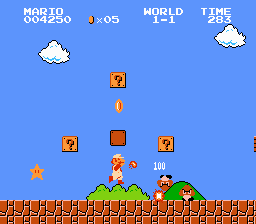
It’s not common, but sometimes a program is written in assembly even when a programming language would work. Two of the best known examples are Super Mario Brothers (1985) and Roller Coaster Tycoon (1999).
Screenshots of two successful computer games written entirely in assembly language: Super Mario Brothers (left) and Roller Coaster Tycoon (right). Both images are shared under Fair Use and are hosted on Wikimedia
There is in general one assembly language per computer processor design: because they map directly to machine instructions, two processors with different sets of instructions also need different assembly languages. Some of the most popular processors have a small number of competing assembly languages that differ in things like what order they list the operands and destination of an instruction or what punctuation they use to represent that something is a variable.
4.2 Programming languages
Some programming languages are designed to be compiled, meaning they will be converted from the programming language to machine instructions (often using an assembly language intermediate step) once, and then the machine instructions will be run thereafter. Compiled languages tend to be somewhat limited in what operations they can easily express: ideas that do not easily translate into machine instructions are generally not part of these languages. As such, programming in these languages tends to be somewhat more challenging than programming in other languages, but the resulting programs tend to be faster and more efficient. Large programs with many features, (like operating systems, web browsers, and high-end games) tend to be written in compiled programming languages. Some of the most popular compiled languages in 2026 are C, C++, Rust, and Go.
Some programming languages are designed to be used as input to a program called an interpreter that reads each statement in the programming language text and decides what actions to have the computer take based on what it reads and the data stored in the computer at that time. Interpreted languages can largely ignore the limitations of machine instructions, allowing programmers to take large steps and summarize the actions the program should undertake in programmer-friendly terms. However, they also take significant extra time and energy figuring out what needs to be done for each programming language statement; it’s not uncommon for a program written in an interpreted language to be 100 times slower than the same program written in a compiled language. Some of the most popular interpreted languages in 2026 are Python, JavaScript, R, Excell, and Sh.
There are also languages that try to combine some benefits of interpreting with some benefits of compiling, compiling from the programming language to some intermediate, simpler programming language that is interpreted. Some of the most popular languages of this type in 2026 are C#, Java, and WebAssembly.
Even within this, there are thousands of programming languages.
Some, like postscript, are designed with a specific task in mind.
Some, like lua, are designed to have very small and easy-to-run interpreters.
Some, like omega, are designed to explore what would happen if you lean into one programming language idea.
Some, like odin, are designed by one person who is frustrated by all other languages and so builds their own.
Some, like kotlin, are designed to try to mix the advantages of two other languages.
Some, like typescript, are designed to try to fix some perceived problems in other languages.
Some, like whitespace, are designed as a joke.
and so on
4.3 Non-programming computer languages
Humans sometimes wish to provide computers with well-defined information that is describing something other than a program, and create computer languages for that purpose. These languages are not programming languages because they are not Turing complete and generally don’t define process at all, but some of them are still very useful and prevalent today.
Arguably the most successful non-programming computer language is HTML. HTML is a markup language, meaning it is designed to provide text while marking various parts of the text with additional information, such as being part of a paragraph or list or header or being something to emphasize with italics. HTML can even mark some of its text as being in a programming language, making it very versatile, but its primary design and function is to structure and organize text.
Related to HTML is CSS, a style language that describes how different parts of an HTML document should be displayed. Where HTML might mark that a give word should be emphasized, CSS might express that anything emphasized should be drawn with an italic font.
JSON is a popular data interchange format, a language for expressing common patterns in how data is represented without imposing any particular meaning on the data itself. It has just a few building blocks: text and lists and numbers and mappings; but it allows these to be combined arbitrarily, allowing a wide variety of data to be represented.
SQL is a popular query language, designed to express what specific data to look for in a large pool of data. Query languages can be thought of as being a bit like an unambiguous version of a search engine: instead of finding whatever data comes closest to what you search for they let you express exactly what you want and what you don’t. Query languages also often have ways of expressing changes to make to data.
As with programming languages, there are thousands of other non-programming computer languages, designed to express new ideas or to express the same things as other ideas but in a new, arguably-better way.