In this lab, you will:
· Get familiar with if-else statment and for loops and while loops
·
Get familiar with OpenGL
graphics library
This week's lab consists of three parts.
In the first part you review how loops work in C and consider how
to generate random numbers in C.
In the second part we will write a number-guessing game in C.
In the third part of this lab you will learn to use external
libraries to draw some 3D graphics.
We often want to write programs that do something over and over again, and for that we use loops. There are three types of loops available. The first type is the while loop, which looks like this:
  while( condition )
  {

     Do something...
  }
Of course, condition has to be
replaced by a real C logical condition. As long as the condition
is true, the statements in between the braces get repeated.
For example, copy/paste/compile and run the program below.
Open at Unix terminal (Go to Applications, Utilities, Terminal to open a Unix prompt). Type the following commands at the Unix prompt:
cd ( change to your home directory if you are not already in your home directory)
mkdir lab7 ( create a new directory named lab7 )
cd lab7 ( make lab7 your current directory )
gedit loop1.c & (
& opens the gedit program in another window)
/* The following program generates 5 random integer values from 0
to N. */
  #include <stdio.h>
  #include <time.h>    /* library containing the "time" function */
  #include <stdlib.h>  /* library containing the "rand" function */

  void main(void)
  {
     int N;
     int Total = 5;
     int counter = 1;

     printf("Enter a number: ");
     scanf("%i", &N);

     while(counter <= Total)
     {
       printf(" %i ", rand()% (N+1) ); /* generate a random number between 0 and N inclusive */
       counter = counter + 1;
     }

     printf("\n");
  }
The function rand()
returns an integer value from 0 to RAND_MAX ( a constant
equal to 2,147,483,647 on our lab machine).
Answer question #1 on the answer sheet.
A variation of the while loop is the do-while loop.
  do
  {
     Do something here...
  } while( condition );
Notice the semicolon ; at the end is required. First the code
"Do something here..." is executed then the condition is checked. If
the condition is
TRUE then the code "Do something here..." is executed again
otherwise if the condition
is FALSE then the loop is finished.
Answer Question #2 on the Answer Sheet.
Often when we write a loop, there's one particular variable whose value determines when the loop stops. For example, in the loops above, the variable counter serves that purpose. So the third type of loop, the for loop, makes it a little easier to control the value of that variable. for loops look like this:
  for( initialize; condition; update )
  {
     Do something here...
  }
initialize, condition,
and update have to be replaced by real C
statements. Use the ; (semicolon) to separate initialize,
condition, and update.
Notice that there are always two semicolons between the
parentheses of a for loop.
A for with the above structure is essentially identical to a while loop like this:
  initialize;
  while( condition )
  {
     Do something here...
     update;
  }
Answer Question #3 on the Answer Sheet.
You will write a program where the computer generates a random integer between 1 and N (for some positive integer N) and the user tries to guess that number. The user will be given an unlimited number of guesses, until the correct number is guessed.
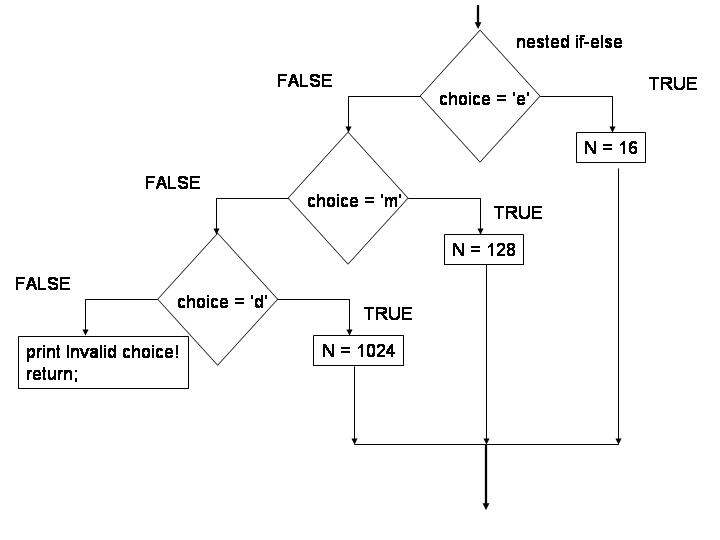
Request from the user 'e'asy , 'm'oderate or 'd'ifficult level
for the game.
'e' means that the user guesses a number in the range 1 and N=16.
'm' means that the user guesses a number in the range 1 and N=128.
'd' means that the user guesses a number range 1 and N=1024.
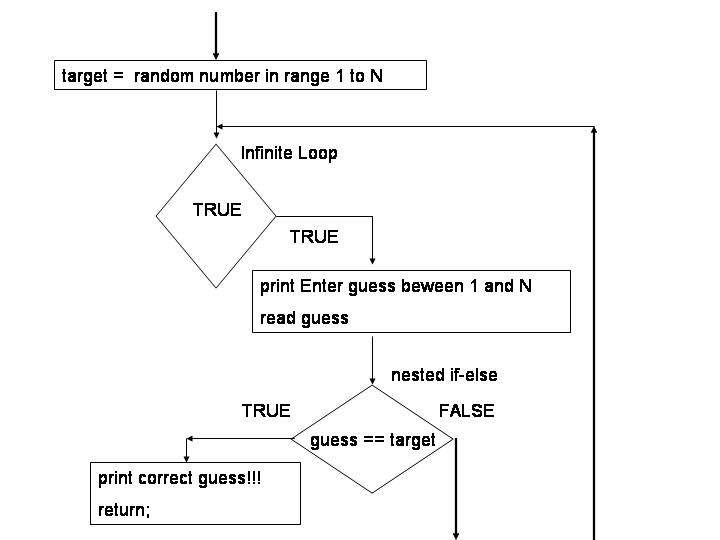
Generate an integer value in the approriate range of 1 to N and
assign to the variable named target.
Use a loop to allow the user to guess any number of times until
the user guesses the value assigned to the variable target .
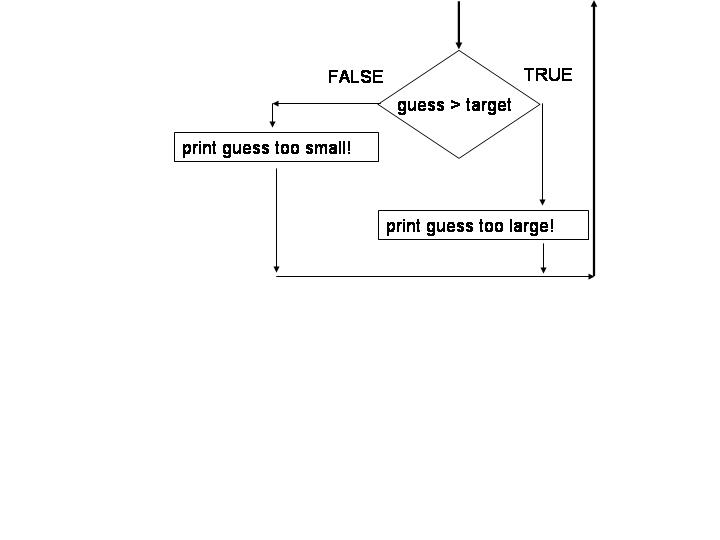
If
the guess is less than or greater than the target then tell the
user whether the guess was larger or smaller than the target, and
allow the user to guess again.
else
if the user makes a correct guess tell them and terminate the
program.
If you have closed the editor please reopen by typing,
gedit guess.c & ( the & makes gedit open in a new window (the background) )
Copy the following piece of code into the guess.c file.
#include <stdio.h>
#include <time.h> /*
library containing the "time" function */
#include <stdlib.h>
/* library containing the "rand" and "srand" functions */
void main(void)
{
/* declare all variables
here */
char choice; /* choice holds a single character, e.g. 'e', 'm' or 'd'*/
int N;
int guess;
int target;
/* prompt the user to enter
the SINGLE character e, m or d */
printf( ___________________________________ );
/* read the character
into the variable named choice */
scanf( ____________________________________);
/* use a nested-if or
better a switch statement to assign a value to N */
/* see first flowchart
above */
       switch( choice)
       {
         case 'e': N = 16;
		  break;

		/* complete the other cases and use a default case as shown above in the flow chart */

	} /* end of switch */
/* using the rand function
assign a random integer value from 1 to N to a variable named
target */
/* To generate a random
integer between a and b you can use the expression: rand()%(b+1 - a)
+ a */
target = ________________ ;
/* complete the remainder
of the program using the second flowchart above */
while (1) /* why is this an infinite loop? */
  {


	/* Complete the code inside this infinite while loop. See the flow chart above for details */
/* note that when you printf "Enter guess between 1 and N" , you print the value of the variable N and not the letter N */
} /* end of infinite loop */
} /* end of
main */
Hints:
To generate a random integer between a and b inclusive you can
use the expression: a + rand()%(b + 1 -
a)
When you want to execute two or more statements in an if statement
you will need to use a pair of curly braces { }. For example to
write code that executes if guess = target you write,
if (guess == target)
{
print something
return;
}
To STOP running current job in Unix console, press 'Ctrl' and 'c' at the same time.
Save your code and then compile your program by typing the
following at the Unix prompt:
gcc guess.c -o guess
./guess
OR
gcc guess.c
./a.out
To see a demo of how your program should work download the runnable file named guess_demo. Run this program by typing
$ ./guess_demo
at the Unix prompt. (assuming the runnable file is already in the current directory) If you do not have permissions to run the program type,
$ chmod u+rwx guess_demo
and try running the program again.
Make sure your program works properly before you proceed to the next step. If in doubt, ask your TA for help.
Answer question #4 on the answer sheet.
Now, we'd like to modify the program to generate a different
random number every time we run the program. To do this you will
need to add the statement,
srand(time(NULL));
immediately after the declarations but before any executable code. The statement srand(time(NULL)); sets the seed (or first value) of the rand() function so that the first random number occurs at "random". Every time you re-run your program rand will not always return the same first random number. The statement above says, seed the random number generator with the current time on the computer clock. The time() function returns the time on the clock when the program is running and is to some degree random, assuming the time is kept down to milliseconds. To read more about srand() and rand() see the course book "A Book on C" pp. 95, or simply Google “srand rand”. Then save, compile and run your program.
Answer question #5 on the answer sheet.
In this section, we will learn to use external libraries as part of a C program. One of the most common libraries used in C is the OpenGL graphics library. This is the graphics technology behind many popular video games, such as these. OpenGL has also been used to create feature-length films.
You will use some simple OpenGL code to plot and visualize a mathematical surface z = y*cos(x)*cos(x)/6.0 where x takes values on the interval [-10,10] and y takes values on the interval [-6,6].
The user does not enter any values. The program outputs a plot on a separate window.
We give you most of the code. Download the file named lab7.c . Use the gedit editor and find the code skeleton for the function named myfunction.
Step 1. In the function named myfunction in file lab7.c, locate the comment:
/* Draw coordinate axes */
/* write six lines of code, 2 for each line */
/* see step 1. */
The OpenGL function glBegin(GL_LINES) sets up an environment in which every pair of new vertices you draw creates a line. For example, the code:
glVertex3f(1.0f, 0.0f, 0.0f);
glVertex3f(10.0f, 0.0f, 0.0f);
will create a line from the point (1,0,0) to the point (10,0,0).
glVertex3f takes three floating point numbers as arguments.
Remember that if you type a decimal number in C, the default will
make that number a double. However, the OpenGL functions you will
use in this lab require floats as arguments. This is why you must
put an 'f' at the end of each number.
The glVertex3f function has three arguments,
glVertex3f( x coordinate, y coordinate, z coordinate)
The glEnd() function stops the line drawing environment.
Write OpenGL code in the editor to draw the three coordinate
axes, each starting at the origin and extending out with length
10.
(Note: there should be 3 pairs of statements added to the
file)
When you are ready, compile your program by saving it. Test your
program by running your program copy/pasting the following to the
Unix prompt:
gcc lab7.c -o lab7 -lGL -lGLU `sdl-config
        --cflags --libs`


        ./lab7


        Note, try selecting with your mouse and then middle-clicking to
        copy. Make sure you copy the single quote (').
You should see a window that looks like this:
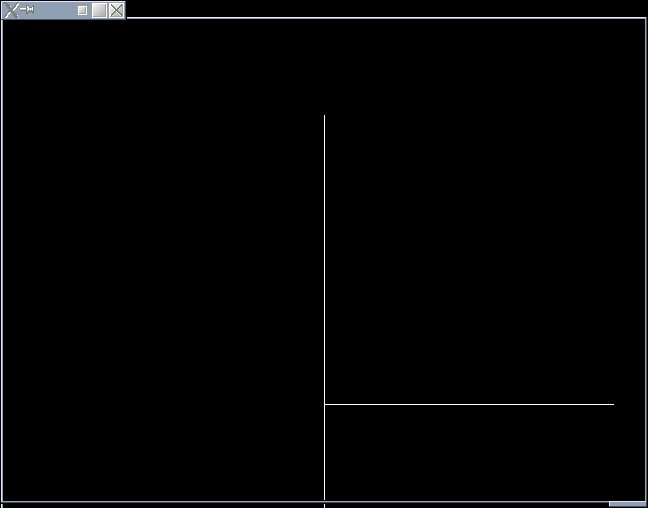
You can rotate the 3D image by clicking on it and then using the arrow keys.
Step 2. Locate the comment:
/* your line of code goes here to compute z see step 2. */
Write a single line of C code in the editor to perform the
following assignment,
z = y*cos(x)*cos(x)/6.0
We are plotting the point (x,y,z) in OpenGL where z =
y*cos(x)*cos(x)/6.0 for values of x in [-10,10] and y in [-6,6].
We use a pair of nested for loops to do this.
Step 3. Locate the comment:
/* your single line of code goes here to plot the point (x,y,z)
see step 3. */
/* remember in using glVertex3f( y coordinate , z coordinate , x
coordinate */
The OpenGL function glBegin(GL_POINTS) sets up an environment in
which every vertex you draw creates an individual point. For
example, the code:
glVertex3f(1.0f, 2.0f, 3.0f);
will draw a point located at (1,2,3) in (x,y,z).
Write a single line of C code in the editor to plot the single
point (x,y,z) using the glVertex3f function.
Remember, the glVertex3f function has three arguments,
glVertex3f( y coordinate, z coordinate, x coordinate)
When you are ready, compile your program by saving it. Test your
program by running your program copy/pasting the following to the
Unix prompt:
gcc lab7.c -o lab7 -lGL -lGLU `sdl-config
        --cflags --libs`


        ./lab7


        Note, try selecting with your mouse and then middle-clicking to
        copy. Make sure you copy the single quote (') is NOT an
        apostrophe but is on the same key as the tilde ~.
You should see a window that looks like this:
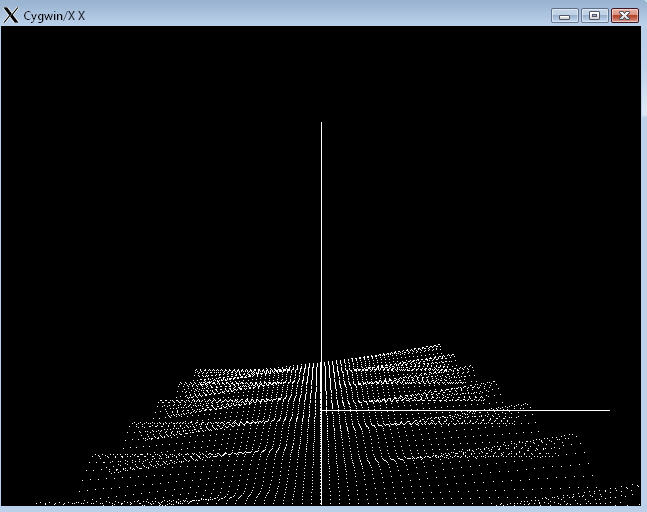
You can rotate the 3D image by clicking on it and then using the arrow keys.
Step 4. Locate the comment:
/* your single line of code goes here to use glColor3f to shade plot see step 4. */
Well, we have a 3D plot, but it looks a little dull. Let's add
some color. The OpenGL function glColor3f takes 3 float arguments
between 0.0 and 1.0. The first argument is the amount of red, the
second is the amount of green, and the third is the amount of
blue.
glColor3f( red , green , blue )
For example,
glColor3f(0.0f, 0.0f, 1.0f)
would be the color dark blue, since it has no red or green, but
is as much blue as possible.
When you call the glColor3f function, everything OpenGL draws
afterwards will be the specified color.
Write a sinlge line of C code to:
1. Make the amoun of blue color be as large as possible.
2. Also add more red as the height (z value) of the function
increases, thus making purple tips (change the amount of red
color equal to the value of the variable z)
Hint: use the glColor3f function. Compile and run your program. It
should look something like this:
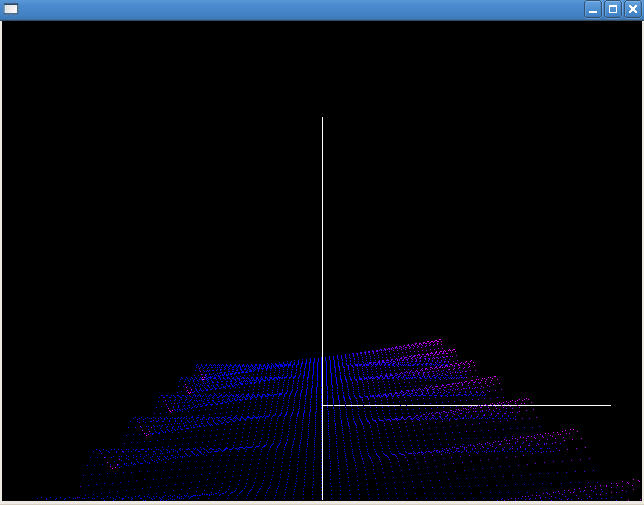
You can rotate the 3D image by clicking on it and then using the arrow keys.
Answer question #6 on the answer sheet.
glBegin(GL_LINES): Sets up the line
drawing environment of OpenGL. Until you call glEnd(), all vertices drawn will be
interpreted as endpoints of a line.
glBegin(GL_POINTS): Sets up the
point drawing environment of OpenGL. Until you call glEnd(), all vertices drawn will be
interpreted as individual points.
glEnd(): Closes any vertex
interpreting environment. If you draw vertices after calling glEnd(), they will be ignored.
glVertex3f(float y, float z, float x):
Draws a vertex on the point specified by the input arguments.
glColor3f(float red, float green, float
        blue)
: Changes the color used to draw OpenGL objects.
Each value is a float between 0.0f and 1.0f.