CS101 - LAB ACTIVITY 11
This lab deals with MP2. Part 1 will
introduce you to qsort and writing the auxiliary
function for qsort. Part 2 will
teach you how to do FILE I/O using the fscanf function and teaches how to create and
access structure data type variables. Part 3 will use the
information you learned in Part 2 to code the solution to the readAlbums function in
MP2.
This lab
should be worked individually.
Objectives
References
Part 1: Using QuickSort to sort an integer array
in ascending / descending / modulus order
1. Requirements Specification (Problem
Definition)
In this part, we're going to generate an array of 10 integers at
random. First we display the list of 10 integers. Then we will ask
the user if they want to have the integers sorted in ascending ,
descending or odd before even order. We will use the function
named qsort found in the standard
library (#include <stdlib.h>) to sort integers.
To run this program:
2. Analysis---Refine, Generalize, Decompose the
problem definition
Our program will have six functions: main , menu
, displayArray,
compAsc
, compDesc
and compOddEven
.
In main we will need to call the qsort function. qsort
takes four parameters, in this particular order :
qsort(name of the array to be sorted, number of
elements in the array, size in number of bytes of each element
of the array, comparison function name)
-
The name of the array to be
sorted. In our program in lab10, nums is
the name of the array.
-
The number of elements in the array. In our case,
the number of elements in the array is 10 but we will use the
constant ARRAY_SIZE which is defined as having the value 10.
-
The size, in bytes, of each element in the array.
Since each element of the array is an integer we will use sizeof(int) (which equals 4 on our
lab machines since an integer takes 4 bytes of memory). If our
array was of datatype double then we would have used
sizeof(double) which is 8 on our lab machine since a variable
of datatype double takes 8 bytes of memory.
-
A function name. You will have to write the
auxiliary functions named compAsc or compDesc or
compOddEven. The compAsc
or compDesc or compOddEven functions
each have two parameters, both are pointers to an
array element.
3. Design---Develop Algorithm
You will need to code six functions: main, menu, displayArray,
compAsc and compDesc compOddEven.
menu function
The menu function has no input arguments and it returns an
integer. So its function definition looks like:
      int menu(void)
      {
        int choice;
        printf( "\n ....") ;
        scanf("%i", &choice);
        return choice;
      }
Here is the algorithm for the menu function in pseudo-code:
- print the following menu (copy and paste into a printf)
"\n1) sort in ascending order (2 3 4 1)
==> (1 2 3 4)\n"
"2) sort in descending order (2 3 4 1)
==>(4 3 2 1)\n"
"3) sort in odd-even order (2 3 4 1) ==>
(3 1 2 4)\n"
"0) exit\n"
"Enter your choice:
"
- use scanf to read the value the user types (either 0, 1 , 2 or
3) into an integer variable named choice declared in the menu
function
compAsc function
We will give you the code for the compAsc function:
 	int compAsc( int * ptrL , int * ptrR)
      	{
      		if( *ptrL < *ptrR)
		  return -1;  /* don't swap */
		else if (*ptrL > *ptrR)
			return 1; /* swap */
		     else
			 return 0; /* equal values */

        }
compDesc function
The code for the compDesc function is almost identical to the code
for the compAsc function except that it returns an integer value
of the opposite sign. Copy and paste the code for the compAsc
function and change its name to compDesc and make the necessary
changes.
compOddEven function
The code for the compOddEven will sort the array so that odd
numbers come before even numbers. A number is even if its
remainder on division by two is 0 ( number % 2 == 0) and a
number is odd if its remainder on division by two is 1 ( number %2
== 1) . Use an if-else statement, IF (*ptrL) % 2 == 0
AND (*ptrR) % 2 == 1 then swap ELSE (if those
conditions are not met) then don't swap.
displayArray function
We will give you the skeleton for this function.
	void displayArray( int arr[] , int count)
      	{
		int i;
		 /* use a for loop to print out all the elements of the arr array */


		/* after the loop use the statement below to add an extra blank line */
		printf("\n");

	}
main function
Here is the algorithm for main in pseudo-code:
while( 1> 0) /* start of infinite loop */
{
/* A. Call the menu function, assigning the value it returns to an integer variable named choice */
                   /* B. Use a switch statement on the variable named choice declared in main. In case 1: call the qsort function using compAsc then call the displayArray function. */
		   /* In case 2: call the qsort function using compDesc and then call the displayArray function. */
                   /* In case 3: call the qsort function named compOddEven and then call the displayArray function. */
		   /* In case 0: return;  */
		   /* default:  print the message "Invalid choice!". You won't need to code anything besides this single printf statement. */
} /* end of infinite loop */
4. Implementation --- Write the "Program" (Code)
-
Use
gedit to create lab11.c
gedit lab11.c
-
You need to include some header files and
define some constants. The beginning of your program should
look like this:
#include <stdio.h>
#include <stdlib.h>
#include <time.h>
#define ARRAY_SIZE 10
#define MAX_NUM 20
-
Write code for the menu function (see
pseudo-code above).
- Write code for the compAsc , compDesc and
compOddEven functions (see pseudo-code above).
-
Now we shall
give some details on how to write our main function. Within
the main function.
Create an integer array, and call it nums.
It should have ARRAY_SIZE elements.
-
Initialize the seed for random
number generation.
srand(time(NULL));
-
Next write a for loop to initialize every
element of nums to a random number from 1 to MAX_NUM. Use i
as your loop counter (don't forget to declare it!). Your
loop should look like this:
for(i=0; /* Replace this comment with the beginning of your loop... */; ++i)
        nums[i] = (rand() % MAX_NUM) + 1;
-
Next, call the
function displayArray and pass it the array name "nums" an
the count ARRAY_SIZE. You will also need to write the code
for this function (the function definition for
displayArray).
-
Now it's time to check your program up to
this point. Save, compile, and run your program. When you
run your program, you should see a list of 10 positive
integers that looks something like this: (the values won't
be the same since we are generating the values randomly)
11 15 8 4 17 16 13 10 9 10
- If everything looks good (ask your lab TA
if you can't fix any compile or run-time errors) then proceed
to the next step,
- We next add the infinite while loop and
inside this loop we first obtain the users choice from the
menu and then use a switch statement to call qsort or return
to the Unix prompt (see pseudo-code above).You can copy and paste the loop you have
written previously.
        while( 1> 0)

              {
/* Obtain the users "choice" from the menu */
        		/* Use a switch statement  (based on choice) to call qsort for compAsc or compDesc or compOddEven or return to the Unix prompt. After you call one of the compXXX functions don't forget to call displayArray */
		    /* If the choice is not valid tell the user "Invalid choice!". */
}
5. Run the program
At the Unix prompt type:
gcc
lab11.c -o lab11
./lab11
Note: If
you see any warnings about the fourth argument of qsort, you
may safely ignore them.
For example, you may get something like the following as output
from your program:
11 15 8 4 17 16 13 10 9 10
 Enter your choice of sorting:

 1) sort in ascending order (2 3 4 1) ==> (1 2 3 4)
 2) sort in descending order (2 3 4 1) ==>(4 3 2 1)
 3) sort in odd-even order (2 3 4 1) ==> (3 1 2 4)
 0) exit
Enter your choice: 1
4 8 9 10 10 11 13 15 16 17
Answer
question #1, and #2 on the answer sheet.
Part 2: File I/O , Structures and
Sub-structures
We will read data from a file using the fscanf
function. We will read the values from a file named part2.dat
(download this file) into a structure variable of data type Album.
FILE I/O
( lecture 24 slides 9-12)
In lecture and labs we have read data from files using Unix
redirection ( < ). In this, Part 2 of Lab 11 we want to
read from the file named part2.dat without using Unix
redirection.
To do this we will use the following code( the complete program
is shown below.)
step 1) declare a pointer that will point to the file we want to
access.
FILE *
fileptr;
The
data type FILE is a structure data-type but for us lets just
view it by its name "FILE" and so we read this statement
as: declare a new variable named fileptr
that points to a file. So fileptr will hold the address
of a FILE and not the FILE
itself.
There may be many files in our current directory. We want
fileptr to point to part2.dat. We can do this through the
following statement.
/* the
following involves FILE I/O see lecture 24 slide 12 */
fileptr = fopen("part2.dat",
________________); /* open file part2.dat for reading, choose a
correct mode "r", "w" or "a" to fill in the blank */
If fopen succeeds in finding part2.dat
in your current directory then fileptr
will be assigned the address of the "FILE" named part2.dat.
If part2.dat is not in your
current directory then fopen will return the NULL
pointer (see lecture 19&20 slide 8) and we should
check for this case.
if (fileptr == NULL)
{
printf("file part2.dat not
found! \n");
return; /* return to the
Unix prompt */
}
Notice that if fileptr
equals NULL we will return;
,that is, main
will terminate and not excute any more code.
However if fileptr is NOT equal to
NULL then we can start to read from part2.dat by
using the fscanf
function.
The fscanf
(file-scanf) function works just like the scanf
function except it reads from a file. Which file? We nee
to specify the file by using fileptr
as the first argument.
/* read cdno, title, artist and num_tracks
from the file , see Lecture 24 slides 6 and 14 for
information on fscanf */
/* see Lecture on variables like x.cdno,
x.title, x.artist, where x is called a structure
data type variable */
/* see also the explanation below on
Structure Data Types */
fscanf(fileptr, "________________ _____________
_______________ %i", &x.cdno, x.title, x.artist,
_______________________ );
But what does x.cdno
and x.title and x.artist mean?
Structure Data Types (lecture
22&23 slides 12-17)
In our program below we have declared two new data types,
Track and Album. Track
and Album
are structure
data types.
We have used typedef before. What is new is
the
struct { } mechanism. Using a typedef
statment means that Track and Album
are new data types not variables just like int
is a data type and not a variable.
typedef struct {
                       char    name[40];    /* track name or song name  */
                       int     length;      /* time in seconds */
                } Track;

 typedef struct {
                	int     cdno;
                	char    title[30];
                	char    artist[20];
                	int     num_tracks;
                	Track   tracks[4]; /* each album can hold up to just 4 songs in this problem */
        	} Album;
This enables us to declare a variable x as follows:
Album x; /* x
is a single Album in this example. In MP 2 we will declare
an array named albums of data type Album */
The variable x
is not a simple variable like int x; or float x;
or double
x; , x has
numerous fields named cdno, title, artist, num_tracks and
an array field named tracks.
To assign values to structure variables we need to use the dot
(.) operator. For example to assign the value 909 to the cdno
field of x
we could do the following:
x.cdno = 909;
but NOT
cdno =
909; /* illegal C statement */
and NOT
x = 909; /*
illegal C statement */
however for strings you cannot use = you must use the strcpy
function. For example,
strcpy(x.title, "Let
It Be... Naked");
would
assign "Let It Be... Naked" to
the title field of
x and
strcpy(x.tracks[0].name, "Get Back");
x.tracks[0].length
= 154;
would assign "Get
Back" to
the name sub-field
of the tracks[0] field
of x
and 154 to the length
sub-field of the tracks[0]
field of
x .
However the following would NOT be legal!
x.title
= "Let It Be... Naked"; / * illegal C statement */
x.tracks[0].name
= "Get Back"; / * illegal C statement */
But our goal is to read
(using fscanf ) the following data found in part2.dat,
 909;  Let It Be... Naked; The Beatles; 4
 Get Back; 154
 Dig a Pony; 218
 For You Blue; 147
 The Long and Winding Road; 214

and store these corresponding values in the variable named x. If you forget why we are
using the ; in the above data as a delimiter please go back to Lab 9 Part 3 to review how
we were able to read (using scanf) strings that contains blanks.
909 is the cdno for this album
Let It Be...
Naked is the title of the album
The
Beatles is the artist
name
4 is the
value of num_tracks , the number of
tracks (songs) on the album
and the 4 tracks
are listed in the format
name; length(in seconds) as
 Get Back; 154
 Dig a Pony; 218
 For You Blue; 147
 The Long and Winding Road; 214
Complete the program below by filling in the blanks. The program
should use FILE I/O to read the data from the file named part2.dat into the
structure variable named x.
Notice that the tracks[0],
tracks[1], tracks[2] and tracks[3] fields are of data
type Track.
Look at the memory map shown below.
Our goal is to assign values we read from the file named part2.dat and assign
those values to the fields and sub-fields of x as shown below.
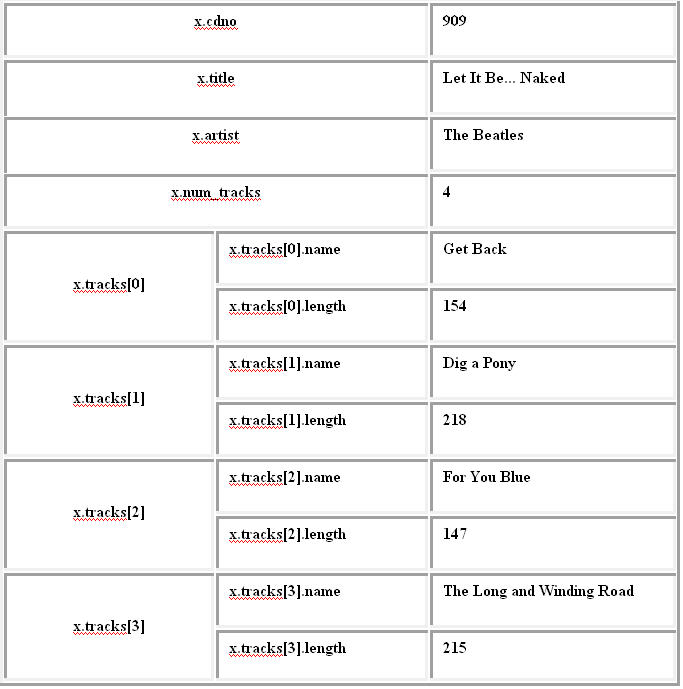
Answer question #3 by filling in the blanks below on the answer sheet.
3. Complete the program below by filling in the blanks
 #include <stdio.h>


 typedef struct {
                       char    name[40];    /* track name or song name  */
                       int     length;      /* time in seconds */
                } Track;

 typedef struct {
                	int     cdno;
                	char    title[30];
                	char    artist[20];
                	int     num_tracks;
                	Track   tracks[4]; /* each album can hold up to just 4 songs in this problem */
        	} Album;
void main(void)
{
Album
x; /* x is a single Album in this example. In MP 2 we
will declare an array named albums of data type Album */
int i;
FILE * fileptr;
/* the
following involves FILE I/O see lecture 24 slides 9-12 */
fileptr = fopen("part2.dat",
________________); /* open file part2.dat for reading */
if (fileptr == NULL)
{
printf("file part2.dat not
found! \n");
return;
}
/* read cdno, title, artist and num_tracks
from the file */
fscanf(fileptr, "________________ _____________
_______________ %i", &x.cdno, x.title, x.artist,
_______________________ );
/* read name and length for the four tracks
from the file */
for(i = 0; i
< x.num_tracks; ++i)
fscanf(fileptr, " %[^;];
%i", _______________________, &x.tracks[i].length );
/* print out the results */
printf("%i %s %s %i \n", x.cdno, x.title, x.artist, x.num_tracks);
for(i = 0; i
< x.num_tracks; ++i)
printf("%s, %i \n",
x.tracks[i].name, x.tracks[i].length);
}
You can test your code by copying and pasting your code above
into a file named part2.c
and then compiling and running the program. At the Unix prompt
type,
gcc part2.c -o part2
and if there are no errors
then run your program by typging the following at the Unix prompt.
part2
Don't forget that you needed to have downloaded the file
part2.dat in order
for this program run correctly. Or you can just create a file
named part2.dat
using gedit and copy/paste the following data:
 909;  Let It Be... Naked; The Beatles; 4
 Get Back; 154
 Dig a Pony; 218
 For You Blue; 147
 The Long and Winding Road; 214
Part 3: MP 2
In this part of Lab 11, you will be writing the readAlbums and mainMenu
functions of your MP2.
Follow the instructions for MP2 under the heading
"Preparation" to get ready to do the MP .
Also, read the brief introduction and familiarize yourself with
the structure definition of an "Album".
mainMenu function
The first thing we'll do is write the mainMenu
function. In gedit if you open the file mp2.h
you will find the prototype:
int mainMenu( void );
Copy and paste this prototype into the input.c
file. DO NOT modify
the mp2.h file. In input.c modify this prototype by
replacing the semicolon with opening and closing curly braces.
Then your input.c file should look like the following:
/* input.c */
#include "mp2.h"
#include "user.h"

int mainMenu( void )
{

}


int readAlbums( char *filename, Album albums[], int num_albums, int max_size )
{

}
(You might notice that in
the prototype for readAlbums that the variable names differ than those
above. That's ok, the names in a prototype don't have to match
the parameter names. We will use the names shown here and not
the ones used in the prototype.)
For the mainMenu
function, don't forget to remove the semicolon from the end of
the line after you copy it over, and to put the code for your
function in curly braces ( "{" and "}" ).
You've done menu functions in previous labs; this one will be
very similar. You want to display the list of options to the
user, and return whatever number the user enters. Assume that
the user always enters an integer. We won't worry about checking
for invalid integer values in the mainMenu
function. You will need to declare an integer variable.
Your menu function should display the following menu:
    Main Menu
    1. Display
    2. Sort
    3. Search
    4. Edit
    5. Statistics
    6. Save to disk
    0. Exit
    Please enter the choice:
Next use the scanf function to
read the value the user entered at the keyboard. Finally, return
the choice to the function that
called mainMenu.
Note: Before you can
compile your code you must copy every function
prototype(except readAlbums) into its corresponding file and
then perform the following three steps:
First, copy and paste the prototype found in mp2.h . Second, remove the semicolon at
the end of the protoype. Third, add a pair of { } (a block to
hold your code for the function.
You will only be writing the code for mainMenu
and readAlbums for this lab 11.
(To write code for other functions, see the Implementation section in
the MP2 instructions for a step by step list of functions.)
When you finish writing your code for the menu function don't
forget to save your changes and "make" your project as described
in the MP2 instructions, that is, at the Unix prompt type,
make
to compile your code or type
make mp2checker
to compile and run the checker.
readAlbums Function
Of course, your CD album program isn't going to be much use
unless it can read a file containing information concerning CD
albums. That's what the readAlbums
function does.
The function header for readAlbums
has already been typed into the input.c
file for you:
int readAlbums( char *filename, Album albums[], int num_albums, int max_size)
{

}
The function readAlbums is
called by main. If you look at the
main function in mp2.c, a line of code that calls readAlbums with the correct parameters
(the filename, the array of Albums
and 0 is the current number of albums and MAX_ALBUMS will be
assigned to max_size) has been
included.
Since you're going to get input from the user (keyboard by
using mainMenu) as well as from
the file (album.dat by readAlbums), we'll have to use real
file I/O (input/output) here, rather than just reading from
"standard in" (the keyboard) and letting the operating system
make us think the file was the keyboard (that's what you've been
doing when you run something like "program
< file"). Since we haven't seen that yet, here's how
it should be done:
Answer question #4 by filling in the blanks below on the answer sheet.
4. Complete the program below by filling in the blanks.
 int readAlbums( char *filename, Album albums[], int num_albums, int max_size)
 {
       /* begin of readAlbums */

        int track, i;
        FILE * fileptr;  /* flieptr is a pointer variable, FILE is a new datatype */

        fileptr = fopen( filename, "r"); /* filename is a string, "r" means open file for reading */

         /* check whether fopen did NOT work correctly */
	 if (fileptr == ____________________________ )
                return -1;

        /* read the data from ALBUM_FILE */
        /* first record looks like ...
                1001; One Heart; Celine Dion; 2003; 14; 2; 13.99
                211.10 96.15 67.93 340.67 138.01 250.97 259.76 74.66 114.92 268.26 126.47 79.63
        */

        /* The datatype Album (from mp2.h) looks like...
        typedef struct {
                int     cdno;
                char    title[30];
                char    artist[20];
                int     year;
                int     num_tracks;
                int     quantity;
                float   price;
                float   sales[MONTHS];  cd sales ($US) over the 12 months in 2005

                Track   tracks[20];
        } Album;
        */

        /* check to make sure that we haven't exceeded the maximum size for the array albums */
        if ( num_albums >= max_size)
	{
                        fclose(fileptr);
                        return num_albums;
        }
        /* you must fill in the blank on the line below */
        /* size starts at 0 */
        while( EOF != fscanf( _____________________  , "%i; %[^;]; %[^;]; %i; %i; %i; %f",
                &albums[num_albums].cdno,
                 albums[num_albums].title,
                 albums[num_albums].artist,
                &albums[num_albums].year,
                &albums[num_albums].num_tracks,
                &albums[num_albums].quantity,
                &albums[num_albums].price) )
	{

                /* read the sales over 12 months */
                for ( i = 0; i < MONTHS; i ++ )
		{
                        fscanf( fileptr, " %f", &albums[num_albums].____________________); /* in copying this code into gedit make sure there are no spaces between the . and you solution */
                }

                /* We need to read the track data into the array named tracks.
                 * The first record  has the following form ...
                 *    I Drove All Night; 240
                 */
                /* The datatype Track (from mp2.h) looks like...
                        typedef struct {
                                char    name[40];    track name or song name
                                int     length;      in seconds
                        } Track;
                */
                for( track = 0; track < albums[num_albums].num_tracks; ++track )
		{
                        /* fill in the following two blanks to read in all the track data */
                        fscanf( fileptr ,________________  , ___________________________________________, &albums[num_albums].tracks[track].length );
                }

                /* we succeeded in reading in one more album so increase num_albums by one */
                num_albums++;
                 /* we don't want to read more CDs than the size of the albums array so check now */

                if ( num_albums >= max_size)
		{
                        fclose(fileptr);
                        return num_albums;
                }
        } /* end of while */

        fclose(fileptr);

	/* return an integer value, the number of albums that are now in the array named albums */
        return _________________________________;
} /* end of readAlbums */
Use a
"space" before %[^;] in a format string of fscanf. This is
critical to ignore any blank space in the input file before
your program sees the track name. When you test your program,
it's going to be a little hard to tell if readAlbums is working if you can't
see what you read in, right? Fortunately, the mp2 checker
provided will allow you to test your readAlbums
function without having to write the main
function. (See below.)
Running the checker for MP2
Before running the checker you must copy all the prototypes
(except for readAlbums
and mainMenu
which you have already done) and paste each function prototype
into its corresponding .c file. DO NOT modify the mp2.h file! Modify each function so
that they have an empty function body, just like what
you did for mainMenu and readAlbums at the very beginning of
this lab.
Run the MP2 checker by typing the following command at the
Unix prompt.
make mp2checker
(make sure you are in the same directory as your MP2
files i.e. the ~/mp2 directory)
If you see any compile errors, correct any mistakes. See the
line numbers in the error messages. Make sure that you display
the lines numbers in the gedit editor (on the menu bar
of the editor click on Edit/Preferences and then click on the
View tab and check the box named "Display line
numbers").
Handing
in your MP2 code
You can handin
your code as often as you like. Only the last handin before
the due date will be graded. Its a good time now to test that
handin works. Click on this link and follow the instructions
to handin your
work now. Ask your TA if you have any problems submitting
your work.
That's all folks!