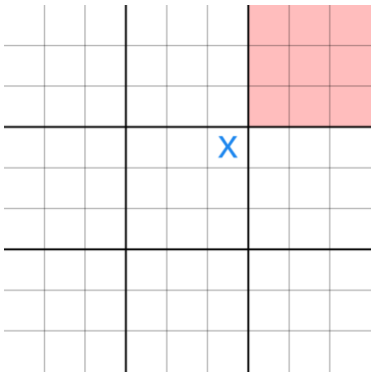
A step sample of ultimate tic-tac-toe
In this assignment, you will implement the minimax algorithm to play Ultimate Tic-Tac-Toe. Ultimate tic-tac-toe is a board game composed of nine tic-tac-toe boards arranged in a 3-by-3 grid. Each smaller 3x3 grid is referred to as a local board, and the 9x9 grid is referred to as the global board.
It is strongly recommended that students use the online tool to play the game and fully understand the rules. For this online tool, remember to select "First Tile Wins" at top left corner from the dropdown list.
The rules of ultimate tic-tac-toe can be found on the wiki page. Ultimate tic-tac-toe is a board game composed of nine tic-tac-toe boards arranged in a 3-by-3 grid. Each smaller 3x3 grid is referred to as a local board, and the 9x9 grid is referred to as the global board. The player starting the game can place their move on any empty spot. After the first move, the opposing player must play in the board corresponding to the square where the first player played, as shown below:
A step sample of ultimate tic-tac-toe
In the above image, at starting of the game, since player "X" played at the top right corner at the central local board, player "O" is sent to the top right local board and only allowed to play there. O's next move determines the board in which X must next play, and so on.
It is strongly recommended that students use the online tool to play the game and fully understand the rules. For this online tool, remember to select "First Tile Wins" at top left corner from the dropdown list. The following is an example picture of the ultimate tic-tac-toe game:
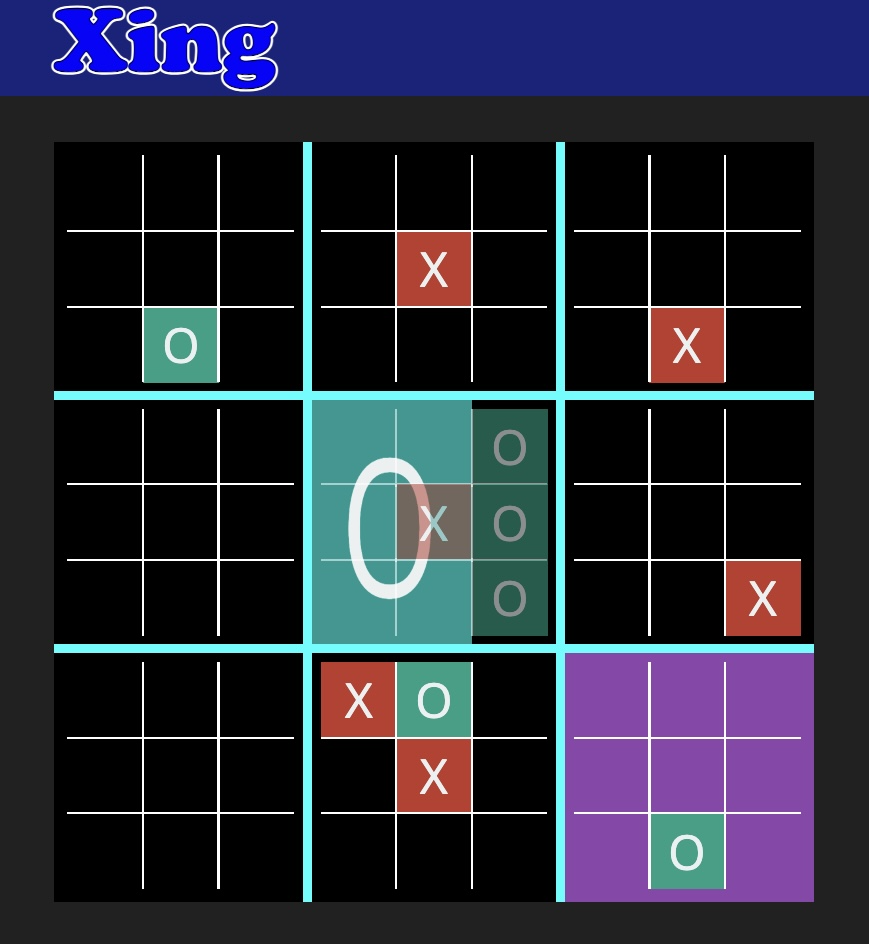
Image from michaelxing.com/UltimateTTT/v3/
The rules for the local board are the same as regular 3x3 tic-tac-toe. Ultimate tic-tac-toe has many variations of rules; for this part of the assignment, the winner will be the one who wins the first local board (the one who first wins in any local board).
The global game board has 9 local boards with 81 available spots. The coordinate of each empty spot is the row and the column number starting with 0. Each local board has an index starting at 0. The first row of local boards has index from 0 to 2, the second row from 3 to 5, and so on.
In the provided skeleton code, the maxPlayer is the offensive agent and the
minPlayer is the defensive agent. The game always starts at the central
local board (index 4). The evaluation function for each predefined agent has three
rules. Rule 1 is exclusive: if the agent has won (three-in-a-row), return
the winner utility immediately and skip Rules 2 and 3. Otherwise, Rules 2 and 3 are
both applied and their scores are summed together.
Minimax search always searches the local board row by row from top left corner to
bottom right corner. The search depth has maximum three levels, including current player,
opposing player, and current player again. Then evaluate the resulting board position after the
third level search. If the evaluation function returns two terminal states with the same value,
choose whichever of the two moves comes first in this raster search order.
Note that the weights for two-in-a-row and prevention are swapped compared to the offensive agent. This is intentional: the offensive agent prioritizes building its own two-in-a-rows (500 > 100), while the defensive agent prioritizes preventing the opponent's three-in-a-rows (500 > 100).
You are provided with uttt.py, which is the only file you need to modify.
The doc strings in the python file explain the purpose of each function:
evaluatePredefined(): Implements the evaluation function for the predefined
offensive/defensive agent.evaluateDesigned(): Implements your own evaluation function.checkMovesLeft(): Checks if there are any legal moves remaining on the board.checkWinner(): Checks if any player has won the game.minimax(): Implements the minimax algorithm for ultimate tic-tac-toe.playGamePredefinedAgent(): Implements the game of predefined agents playing
against each other.playGameYourAgent(): Implements the game of your agent playing against
the predefined offensive agent.playGameHuman(): Implements the game of a human playing against your agent.To run the predefined agents against each other:
python uttt.py
You should submit the file uttt.py on Gradescope.
math, copy, random, time) are allowed.
| Test | Points | Description |
|---|---|---|
| checkWinner | 10 | Correctly identifies winners and non-winner states |
| checkMovesLeft | 5 | Correctly identifies when moves remain |
| evaluatePredefined (offensive) | 15 | Correct utility for offensive agent |
| evaluatePredefined (defensive) | 15 | Correct utility for defensive agent |
| minimax | 15 | Correct minimax values and expanded node counts |
| playGamePredefinedAgent (maxFirst) | 15 | Correct game result when maxPlayer goes first |
| playGamePredefinedAgent (minFirst) | 15 | Correct game result when minPlayer goes first |
| playGameYourAgent win rate | 10 | Your agent beats offensive agent ≥80% of the time |
| Total | 100 |
checkWinner() and checkMovesLeft(), then implement
evaluatePredefined(), then minimax(), and finally the game loop.playGameYourAgent() and evaluateDesigned(), as the custom agent
test runs many games and can be slow on the autograder.playGameHuman() is optional and not graded by the autograder.
It is provided for you to manually test and observe your agent's behavior.