On the previous page we showed how 0s and 1s are used to create numbers – where by number we meant non-negative integer. On this page we’ll explore a few ways computers use those numbers to represent more complicated ideas.
1 Color
The most common way to represent images in a computer is as a grid of colors, where each individual cell of color in the grid is called a pixel, a portmanteau word from picture element. The most common way of displaying such an image is with a light-emitting color display commonly called a screen.1Screen’s oldest meaning is to cover or protect something (such as how a window screen covers the window and prevents insects from getting in); from there it became the name of a freestanding wall-like piece of furniture; then anything which could be used like the screen furniture to catch shadows in 19th century shadow plays; then a similar device used to project movies onto; then other surfaces capable of displaying images like those shown in. The most common way to manufacture a light-emitting color display is not to try to emit every possible wavelength of light, but rather just combinations of three specific wavelengths that optimally trigger the color light receptors in most people’s eyes. Those three wavelengths, seen individually, look like:
A color similar to tomatoes and blood; hence we call this one red.
A color similar to (but much brighter than) the chlorophyll in plants; hence we call this one green.
A color somewhat like the sky and water (but darker and more saturate than those); hence we call this one blue.
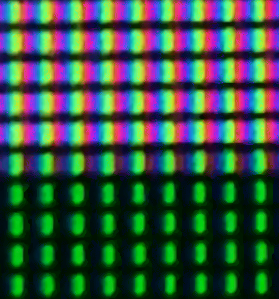
If you look really closely at a screen, you can see the individual colors in each pixel.
A close-up photograph of one course instructor’s LCD screen, showing white above and darker green below. Each (blue, green, red) grouping is one pixel. Colors in the photo are a bit off because the camera’s color receptors did not perfectly match the screen’s color emitters.
Color blindness
Light emitting displays emit as close as we can engineer2 If you see something marketed as a high-gamut display that means it has closer to single-wavelength light emitted by each of its three colored light emitters, giving it a greater ability to trigger one type of cone in your eye without the others and thus a greater range of possible colors it can present. to just three specific wavelengths of light. Those wavelengths are chosen to stimulate specific cones in our eye: red light to trigger the L cone, blue light to trigger the S cone, and green light to trigger the M cone3 Note, though, that the cones have overlaps in the light they can sense, especially between the L and M cones; the three-color system is an approximation, able to create most but not all colors.. But the sensitivities of these cones vary somewhat by individual, and if they happen to vary enough that the three colors don’t line up with those cones very well then we call the person color-blind (or more accurately but less commonly color vision deficient).
In the physical world variations in cone sensitivities have different impact on vision than in the digital world because physical objects typically reflect fairly wide bands of photons, while light-emitting color displays emit just three narrow bands. Even if we built a display that emitted wavelengths that aligned with a less-common set of cone sensitivities we’d still not be ready to show people with those cones accurate representations of real-world colors. To pick RGB colors for a real-world object we find two different light distributions (the real one with wide spectra and the digital one with narrow spectra) that cause our cones to trigger similarly; two people with different cones will have different cone responses to both distributions and thus generally disagree on what digital color best matches the physical color.
Thus, to send a screen data needed to display an image, we send it a list of colors, one for each pixel, where a color is a list of three light intensities, one each for the red, green, and blue light emitters.
In the real world, there’s no maximum amount of possible light, but on a screen there is such a maximum. Your screen’s maximum is likely different from mine, so we don’t want to send colors with physical units like lumens or candela; instead we normalize the brightness, picking a fixed range of numbers and trusting each display to re-map the smallest number in the range to as dark as this screen gets and the largest number in the range to as bright as this screen gets.
But what should we normalize to? 0 makes sense as the bottom of the range: no light emitted, smallest number we can represent in any base. But for the upper range, what should we pick? Three options are fairly common:
Upper limit of 1. This makes certain kinds of math on colors simpler.
Upper limit of 100. This is a percentage-like range that many humans find easy to understand.
Upper limit of 255. This is the largest number that can fit in one byte.
Because computers move data around in bytes, the 255 limit is the one that’s used, meaning there are 256 levels of red, and of green, and of blue, for 2563 = 16,777,216 possible colors. Perhaps surprisingly, there are situations where some people can tell each of those colors apart so it is common to expose the exact byte values to the artists and graphic designers selecting colors.
What’s a good way of sharing 1-byte values? With two hex digits. Thus, to share an entire color we use three bytes or six hex digits, traditionally in red-green-blur order with a hashtag in front to indicate that it is a color.
A nice orange color can be made with full-on red, half-on green, and all-off blue. To convert that to a hex color code,
Convert to normalized 0–255 range:
Red is all on: 255
Green is half on: 255/2 is around 127
Blue is all off: 0
Convert to two-digit hexadecimal:
255 = 15×161 + 15×160 = FF
127 = 7×161 + 15×160 = 7F
0 is 0×161 + 0×160 = 00
Put together with a hashtag: #FF7F00
If we ask this web page to show that, we get this:
How much blue light is emitted by #ACEACE?
Split into red, green, and blue parts
Red is AC
Green is EA
Blue is CE
CE to decimal:
C = 12, in the 16’s place = 192
E = 14, in the 1’s place = 14
together, that’s 206
Thus, 206/255 of the maximum blue light is emitted (about 81%)
Half in color does not mean half as many photons
We do not perceive light linearly: if something looks twice as bright as something else, it is emitting significantly more than twice as many photons. That is handled internally to the computer by having both color data and color hardware use a perceptual, rather than mathematical, version of half, converting between the two with something called a gamma function.
Because of this, #7F7F7F looks about half as bright as #FFFFFF, but actually emits only 21.2% as many photons.
Build your own color
Use the sliders below to select how much red, green, and blue light you want and see the resulting hex color code and how your screen displays that color.
Then do it again, and again going until this starts to feel familiar.
Hex code: #
Rendered color:
2 Numbers
When giving an overview of numbers, we assumed you could tell a number begins and ends, and we ignored negative and noninteger numbers entirely. But if we’re building a machine to work with numbers, those are not things we can ignore.
2.1 Boundaries of numbers
When you read a number, you can tell where it begins and ends because it is surrounded by non-number spaces and/or text. Computers don’t have that leisure because all they store are numbers.
By far the most common solution to this is to use fixed-width integers. We pick some number of digits – 32 bits = 4 bytes is a common choice – and declare that the integer uses that number of digits. Smaller numbers use zeros to their left to reach that many digits.
102 is 66 in hex or 1100110 in binary. Stored in 32 bits, that would be 00000066 (hex) or 00000000000000000000000001100110 (binary).
Numbers that are too large for the chosen number of digits cannot be stored. The easiest way to build machinery in those cases is to have the excess digits simply vanish; for example, in 3-digit decimal we might say that 980 + 051 = 031 because we can only keep three digits of the true answer, 1031. The loss of high-order digits that would make a number larger than the space available is called overflow and has been the cause of some embarrassing and destructive computer bugs.
Overflow crashed the Ariane 5 rocket
One of the most dramatic errors caused by a computer’s number overflowing was the maiden flight of the Ariane 5 rocket (Ariane flight V88, ). The Ariane 5 was a much larger rocket than the previous Ariane 4, but re-used some of the Ariane 4’s flight control software. This caused a number that tracked how quickly the rocket was moving sideways to reach a value impossible with the Ariane 4 and larger than the flight control software’s number could store. The software actually noticed the overflow, but the code that followed such an observation wasn’t written very well and incorrectly caused the rocket to take a very sharp turn, more than it could structurally withstand at that speed, resulting in it exploding 37 seconds after launch.
The estimated cost of this error is upwards of $300 million, not including loss to the reputation of the Arianespace company that launched it.
Computers can be designed to work with arbitrary-length numbers by using the same tools humans use: representing the numbers in a form where the beginning and end of the number can be detected. Typically, this is a multipart scheme:
a meaning for each byte is chosen with some bytes being parts of a number and others being markers for its ends;
the computer scans the bytes, combining the consecutive number parts;
arithmetic is performed on the number;
the computer turns the number back into a sequence of bytes, including marking its ends.
This requires significantly more computing resources than the more common fixed-size numbers and because of that is only used in situations where the extra size is expected to pay off.
2.2 Negative numbers
You likely learned about negative numbers with a special symbol ‒ in front of a number that indicates it is negative. Computers can do something similar, and do in some situations, but that representation requires a lot of paired if negative and if positive machinery internally.
Overflow can actually be used to get the effects of negative numbers without needing any special logic. One definition of ‒102 is a number which, when added to 102, results in 0. With overflow and a fixed number of digits, there’s a positive number that meets that rule too; for example, with 4-digit numbers 9898 + 0102 = 0000 (because 10000 overflows to just 0000) so we could say that ‒102 = 9898. This trick (converted to binary) is used extensively in computers to make hardware simpler, and can mean that we need external information to know whether we ought to display a number as +9898 or ‒102. It also means that overflow might change a positive number into a negative one or vice versa.
2.3 Nonintegers
There are several ways to deal with noninteger numbers, but one of the most straightforward is to continue basic place-value logic past the 1s place. For example, in 123.456 the 5 is two places to the right of the 1s place so it is multiplied by .
Place value
Number
1
2
3
4
5
6
This idea works just as well in binary as it does in decimal, but begs the question: how do we know where 1s place is? We could use a separate symbol like a ., but that is harder for a computer.
You likely learned to call the . in a number the decimal point but in binary it would be the binary point and in hexadecimal the hexadecimal point, so in computing we just call it the point.
One option is to always keep it in the same place: we store numbers using 64 bits where 32 are to the left and 32 to the right of the point. This is called a fixed-point number because the point is fixed in a specific place.
Far more popular than fixed-point has been a version of scientific notation called floating-point.
Recall that in scientific notation, we can represent any non-zero number as where and is an integer. A shorthand for this notation writes as e, allowing these numbers to be typed without any superscripts.
or 1.23456e2
or -3.14159e0
or 1.85e-3
Floating-point numbers do this in binary, using where and is an integer. is stored in fixed-point, is stored as an integer, both with fixed number of digits, the two together represent a number.
Because both the exponent and the other part (often called a significand or mantissa) are stored with a fixed number of digits, both can experience overflow.
Overflowing the mantissa causes loss of precision. You’ve experienced this outside of computing: but with a finite number of digits we drop the extra digits, making a less-precise . If we then add three of those imprecise numbers together we get , not . The same thing happens in binary: but with a finite number of digits we drop the extra bits, making a less-precise . Adding three of those together we get , not .
Numerical imprecision killed 28 soldiers
On the Iraqi military launched a Scud missile at an American military installation, and the Americans responded by launching a Patriot missile to intercept it. But the American control software did part of its computation based on the current time of day, which was stored initially by checking a clock and then updated 10 times a second by adding 1/10, which in binary is 0.0001100110011…. Because the software had been running for several days, the numerical error had accumulated to about 3/4 of a second, more than enough to cause the Patriot to miss the Scud; the Patriot (not the Scud) then crashed into American barracks and killed 28 soldiers.
Overflowing the exponent is much more serious, serious enough that computers detect and handle it specially. If the exponent would get more positive than we can handle we change the number into a special value that means , and if it gets more negative than we can handle we change the number into a special value that means . Since we have special values anyway, we also have a special value that means not a number which we use for arithmetic we can’t compute like or .
3 Text
Computers often represent text. How do they do this? By making a big list of every possible symbol that could appear in text and passing around positions in that list.
There have been many such lists of symbols created over the years, including some famous ones that still get referenced (such as ASCII), but the standard list today is Unicode. As of January 2026, that list is around 40,000 characters long and growing by more than a thousand new characters a year.
Numbers in Unicode’s list are almost always shown in hexadecimal, often with a U+ in front to make it clear that this is a number on that list. Thus, U+0051 means Unicode’s entry with hex number 51, which is 81 in decimal, and is Q.
The task of figuring out what to put in the list is a massive undertaking because cultural expectations differ so widely, and along the way the list has become complicated.
There are simple characters like entry U+0051, Q.
There are combining characters like entry U+030A which by itself looks like ̊ but when next to another character moves to it on top of it, like ̊m or ̊k.
There are control characters like entry U+007F which means delete the next character you see.
There are characters that have color as well as shape like entry U+1F9E1 🧡 and U+1F308 🌈.
There is a special entry U+200D which tells computers to try to merge the characters beside it into a single shape, if they know how do to so; for example, U+1F468 and U+1F980 next to each other render as 👨🦰 but put a U+200D between them and they’re supposed to render a single emoji, 👨🦰.
All that complexity of how to display it aside, the underling representation is simple: text is just a sequence of numbers.
3.1 UTF-8
In the 1990s, many programs assumed that all text was in ASCII. ASCII has 1 byte per character, with every byte (when written in binary) beginning with a 0 bit: from 00000000 to 01111111.
Unicode had been defined and had some success, but it allowed up to 1,112,064 characters, requiring 3 bytes to fully represent. Most numbers in that range were (and still are) unused, so some software had adopted a 2-byte version called UCS or UTF-16, but that was incompatible with the more common software that used 1-byte ASCII.
Enter UTF-8. UTF-8 is a clever scheme for encoding the integers (called code points) identifying Unicode characters with a variable number of bytes so that
Any ASCII string is unchanged in UTF-8.
Code that works on ASCII strings (such as comparing and sorting them) does the right thing when given UTF-8 instead.
UTF-8 is not the most efficient scheme we could come up with, nor the easiest to code with, but it is backwards compatible, meaning most things that worked with its predecessor also correctly work with it. Backwards compatibility is a huge benefit in getting a new technology adopted, comparable in importance to good marketing and arguably more important than any new feature or other technical advantage.
The core idea of UTF-8 is as follows:
If highest-order bit of the byte is 0…
…then the byte’s value as an integer is 127 or less; treat that value as the code point of a character (just as ASCII does) and move on to the next character in the next byte.
Otherwise, the character uses as many bytes as the first byte has consecutive high-order 1-bits.
That could be a high-order 110 for a 2-byte character, or 1110 for a 3-byte character, or 11110 for a 4-byte character.
Each of the other bytes of the character has 10 as its high-order bits.
Put all the remaining bits together as the code point.
Suppose text is represented with the following sequence of bytes (in hex):
49
20
61
68
20
E2
98
BA
The binary of 0x49 is 0b01001001 which starts with a 0, so this is ASCII; looking it up we find it means I
The binary of 0x20 is 0b00100000 which starts with a 0, so this is ASCII; looking it up we find it means
The binary of 0x61 is 0b01100001 which starts with a 0, so this is ASCII; looking it up we find it means a
The binary of 0x61 is 0b01101000 which starts with a 0, so this is ASCII; looking it up we find it means m
The binary of 0x20 is 0b00100000 which starts with a 0, so this is ASCII; looking it up we find it means
The binary of 0xE2 is 0b11100010 which starts with three 1s, so this is the first of three bytes
The binary of 0x98 is 0b10011000 which starts with 10, as expected
The binary of 0xBA is 0b10111010 which starts with 10, as expected
The extra bits of these three are 0010 011000 111010, which is 0x263A; looking it up in Unicode we find it means ☺
Thus, the entire text is I am ☺.
UTF-8’s rules are complicated and weird-seeming and could have been much simpler if we started from scratch. But ASCII converted to UTF-8 doesn’t change at all, and bigger code points have bigger initial bytes which makes old sorting and comparing code work unchanged, and you can always tell if a given byte is the beginning of a code point or not which makes moving through text one character at a time work well. All of that backwards compatibility (and the new first-byte detection feature) helped make UTF-8 the dominant way of expressing text today.
How UTF-8 came to be what it is now
In 1992, Dave Prosser at AT&T’s Unix System Laboratories proposed that something like UTF-8 was needed, though his plan was not as backwards compatible as UTF-8 later become.
Ken Thompson, a successful operating system programmer working at Bell Labs, implemented a version of Prosser’s idea in Bell’s operating system of the time (called Plan 9), but it didn’t seem good enough and removed it.
Ken had lunch in a diner with Rob Pike, a colleague at Bell, and the two worked out the core ideas of UTF-8, writing their ideas on a place mat which they took back to Bell and used to add their idea to Plan 9’s code.
The next year (1993) they published their idea at a conference.
Five years later (1998) it had enough buy-in to be proposed by the Internet Engineering Task Force as a recommended way to store text.
Five years after that (2003) the IETF refined the proposal to be more backwards compatible by removing some things that didn’t lime up with alternatives like UTF-16. At that point it was used by under 2% of all webpages.
Five years later (2008) UTF-8 became the most common way of storing text on the Internet, with just over 25% of web pages using it.
As of January 2026, UTF-8 is used by about 99% of all websites surveyed by w3techs and is the default way of encoding text in most operating systems and programs.