Hardware is a term used for physical machines that process information and make p a computer. There are multiple hardware components in any usable computer, and each can be designed in multiple ways. This page attempts to give an overview of a few of the most common components.
Each hardware component will have some way of storing 0 and 1, but those ways vary between components and sometimes within a single component. Examples include
A tiny magnet with the north (1) or south (0) pole pointing up.
A wire with high (1) or low (0) electrical pressure.
An optical fiber with bright (1) or dim (0) light.
An electrically isolated component with a negative (1) or neutral (0) ionization.
A reflective surface that is smooth and shiny (1) or rough and matte (0).
… and so on. Any two distinguishable states will work, and each hardware component uses a pair that makes sense for it.
Processors are hardware that perform arithmetic and other computations. By far the most common processor technology today uses electricity for information and microscopically-small silicon-based semiconductor components to implement the machinery. But that’s just because those are fast and cheap; the same ideas can be built using much larger, more easily visualized components as well.
Processors use some kind of pressure to represent 1 and its absence to represent 0. Commonly, this is electrical pressure, also called voltage, but we could also use something else (like water pressure) if we wanted.
Processor work by letting that pressure flow through established channels. Commonly, this flow is electrical current through wires, but it could be something else (like water current though pipes) if we wanted.
1 Switches (transistors)
The key component that lets processors work is two kinds of pressure-activated switches, called transistors in an electrical setting or valves in a water setting. One type of switch connects two channels into one when pressure is applied and disconnects them when it is removed; the other type does the complement, disconnecting two channels when pressure is applied and connecting them when it is removed. Both have some kind of threshold pressure, a pressure strong enough to activate the switch, and some noise or variation in individual switches; to deal with that variation 1 is chosen as a pressure high enough that even the stiffest switch is activated and 0 as a pressure low enough that even the softest switch is not.
Illustrations of several switches
An example pressure-activated water valve.
A piston is placed in T-junction of three pipes. Pressure in the central pipe will push against the piston, moving it one way; lack of pressure allows a spring to move it back the other way. A hole bored through part of the piston connects the other two pipes in one position of the piston but does not connect them in the other position.
The illustrated piston has the bore aligned to connect the pipes when pressure is applied and disconnect them when pressure is removed. Moving the bore to the other side of the piston would create the complementary type of switch which connects without pressure and disconnects with pressure.
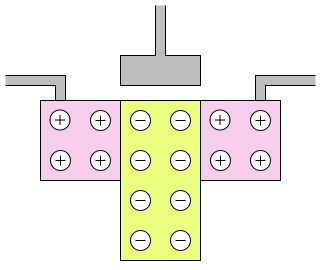
An example transistor.
A central wire ends in a plate that is near but not electrically connected to the rest of the transistor. Below that is a piece of silicon that is doped with a second element that gives it some spare negative charge carriers (electrons not bound to any one electron cloud). On either side of that are pieces of silicon doped with a different element that gives it some spare positive charge carriers (holes in the electron clouds); each of these has a wire attached.
In the normal state, this transistor does not allow current to flow between the two wires because current cannot transition between the negative and positive charge carriers.
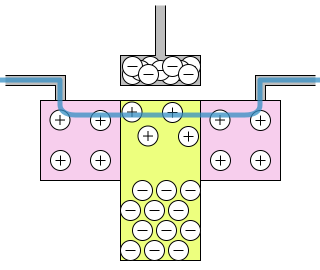
When electrical pressure is applied to the central wire, the plate fills with electrons, creating an electrical field that pushes the negative charge carriers in the central silicon away and then pushes even more electrons away, creating space for positive charge carriers near the plate. Current can now flow between the other two wires, using positive charge carriers across all three pieces of silicon.
The illustrated transistor connects the wires when given a negative charge voltage. Swapping the two types of doped silicon would create the complementary type of switch which connects with positive charge voltage.
Switches require a source of power to operate. Power provides the computer with two pools, one with high pressure (1) and one with low pressure (0). As a computer operates, the pressure carrier (electricity, water, etc.) will move from the high- to low-pressure pool, reducing the pressure differential between the pools; energy is required to restore the previous pressures and continue operation. If we disconnect the power source, the two pools will quickly reach the same pressure and all operation will stop.
With switches and power, a processor is designed in many layers. We design gates out of switches, and adders out of gates, and multipliers out of adders, and so on until we have a full computer. You could readily understand each individual step, but each would take time to understand and there are so many steps we can’t hope to cover them all in this course. Instead, we’ll illustrate a few steps to give a sense of how computers can be built.
2 Switches to Gates
Gates are small collections of transistors connected to a power source with 1 output wire and usually 2 input wires. They are designed so that specific combinations of voltage on the input wires will connect the output wire to the power source, while other combinations will not.
The simplest gate is the not gate. A not gate has the property that its output has voltage if and only if its input does not. A not gate can be built from two switches: one connects the output to the high voltage and is disconnected when there’s input voltage, the other connects the output to the low voltage and is connected when there’s input voltage.
An illustration of a not gate, as described in the text above.
Two modes of a not gate
If there is low pressure in the input (it is 0) then the pressure-disconnecting switch connects the output to the high pressure while the pressure-connecting switch does not connect the output to the low pressure, meaning the output has high pressure (it is 1).
An illustration of the input = 0 case
If there is low pressure in the input (it is 1) then the pressure-disconnecting switch does not connect the output to the high pressure while the pressure-connecting switch does connect the output to the low pressure, meaning the output has low pressure (it is 0).
An illustration of the input = 0 case
A simple two-input gate is the and gate. An and gate has the property that its output has voltage if and only both of its inputs have voltage. An and gate can be built from four switches1 Modern computers build and gates out of 6 switches instead of 4 to handle some nuances of transistor performance, but the 4-switch version is clearer to understand.:
A 0-connecting switch with input A, connecting the output to the 0 power
A 0-connecting switch with input B, connecting the output to the 0 power
A 1-connecting switch with input A, connecting the output to the next switch in this list
A 1-connecting switch with input B, connecting the previous switch in this list to the 1 power
An illustration of an and gate, as described in the text above.
Four modes of an and gate
If both inputs are 0, the output is connected to 0 by two side-by-side switches and disconnected from 1 by two switches in a row, meaning the output is 0.
An illustration of an and gate with both inputs 0, as described in the text above.
If both inputs are 1, the output is disconnected from 0 by both side-by-side switches and connected to 1 by two switches in a row, meaning the output is 1.
An illustration of an and gate with both inputs 1, as described in the text above.
If one input is 0 and the other is 1, the output is connected to 0 by one of the two side-by-side switches and disconnected from 1 by one of the two switches in a row, meaning the output is 0.
Illustration both ways an and gate might have one input 0 and the other input 1, as described in the text above.
An or gate is like an and gate except its output is 1 if either of its inputs is 1. If you swap the 1 and 0 power connections of an and gate you get an or gate.
These gates are named after English words because they have some relationship to how we use those words. If we think of inputs set to 1 as being true statements and inputs set to 0 as being false statements, then modifying those statements with the word a gate is named after gives a statement with the same truth as the gate’s output.
Suppose input A is the statement I am happy and input B is the statement I am hungry. Both statements be 0 (false) or 1 (true). The combined statement I am happy and I am hungry is true precisely when the and gate would output 1 for those two inputs.
But some English words have more than one meaning. For example, if at a restaurant you are asked would you like salt or pepper? you can answer yes meaning you want one or both; but if you are asked is that for here or to go? then yes is not an option: you’re to pick one and only one of the two.
This leads to another kind of or-like gate, the exclusive or xor. This gate outputs 1 if either one of its inputs is 1 and the other is 0, but outputs 0 if both inputs are the same. We can make an xor gate out of switches, but we can also make it out of other gates:
Put the inputs into an or gate
Also put the inputs into an and gate
Put the output of the and gate into a not gate
Put the outputs of the or and not gates into a second and gate
Use the output of the second and gate as the output of the xor gate
An illustration of making an xor out of an or, a not, and two ands.
While such a gate made from other gates may not be optimal (we can probably use fewer than the 14 switches this would need), it does show how we can design new components out of pieces we’ve already designed.
Sometimes gates are summarized by making a table of all their possible input and output combinations. In keeping with the true/false interpretation of 1/0 that inspires the gate names, these are called truth tables. The four gates we’ve seen so far would have the following truth tables:
A
not A
0
1
1
0
A
B
A and B
0
0
0
0
1
0
1
0
0
1
1
1
A
B
A or B
0
0
0
0
1
1
1
0
1
1
1
1
A
B
A xor B
0
0
0
0
1
1
1
0
1
1
1
0
3 Gates to Addition
Consider adding two 1-bit numbers
0 + 0 = 0; in 2-bit binary that’s 00
0 + 1 = 1; in 2-bit binary that’s 01
1 + 0 = 1; in 2-bit binary that’s 01
1 + 1 = 2; in 2-bit binary that’s 10
The 2s bit of the answer is the same as the and gate: it’s 0 except when both input bits are 1.
The 1s bit of the answer is the same as the xor gate: 0+0 and 1+1 both have a 0, while 0+1 and 1+0 both have a 1.
Thus, one and and one xor can add two 1-bit numbers.
To add three 1-bit numbers we
Add the first two
Add the third to the ones’ place of the result
add the twos’ places of the two addition results (this never has a twos’ place)
1 + 0 + 1
first two: 1 + 0 = 01
third plus ones’ place: 1 + 1 = 10
two twos’ places: 0 + 1 = 1
result: 10
1 + 1 + 1
first two: 1 + 1 = 10
third plus ones’ place: 1 + 0 = 01
two twos’ places: 1 + 0 = 1
result: 11
With three 1-bit additions we can now build arbitrary-bit addition, using the same digit-by-digit algorithm that you learned as a child.
Starting with the low-order digit (right end)
Add the carry (initially 0) and a digit from each number – a total of three digits
Put the ones’ place digit of the result in the answer
Put the other digit of the result as the new carry
Move on to the next higher digit (one step to the left)
Add in base ten
To add 3141 + 9876 we do the following:
Add the last digits and the carry (0): 1+6+0 = 07
Put the ones’ place in the output: 7
Put the tens’ place in the carry: 0
Add the next digits and the carry (0): 4+7+0 = 11
Put the ones’ place in the output: 17
Put the tens’ place in the carry: 1
Add the next digits and the carry (1): 1+8+1 = 10
Put the ones’ place in the output: 017
Put the tens’ place in the carry: 1
Add the next digits and the carry (1): 3+9+1 = 13
Put the ones’ place in the output: 3017
Put the tens’ place in the carry: 1
Add the next digits and the carry (1): 0+0+1 = 01
Put the ones’ place in the output: 13017
Put the tens’ place in the carry: 0
Add the next digits and the carry (0): 0+0+0 = 00
Put the ones’ place in the output: 013017
Put the tens’ place in the carry: 0
… and so on until we are tired of adding 0s
Add in base two
To add 1100 + 0101 we do the following:
Add the last digits and the carry (0): 0+1+0 = 01
Put the ones’ place in the output: 1
Put the twos’ place in the carry: 0
Add the next digits and the carry (0): 0+0+0 = 00
Put the ones’ place in the output: 01
Put the twos’ place in the carry: 0
Add the next digits and the carry (0): 1+1+0 = 10
Put the ones’ place in the output: 001
Put the twos’ place in the carry: 1
Add the next digits and the carry (1): 1+0+1 = 10
Put the ones’ place in the output: 0001
Put the twos’ place in the carry: 1
Add the next digits and the carry (1): 0+0+1 = 01
Put the ones’ place in the output: 10001
Put the twos’ place in the carry: 0
Add the next digits and the carry (0): 0+0+0 = 00
Put the ones’ place in the output: 010001
Put the twos’ place in the carry: 0
… and so on until we are tired of adding 0s
This algorithm is just three 2-bit adders per bit, where a 2-bit adder is an and and an xor, where each of those is just a few switches.
We don’t have to stop there. Subtraction is a lot like addition; multiplication uses a 1-digit multiplication table (which in binary is just an and gate) and a bunch of additions; and so on.
4 Gates to Muxes
In a programmable computer, we often want to pick an option based on an input. For example, we want to add if we see a + but subtract if we see a -. Picking complicated things like that will be built off of picking a single wire, a tool that is called a multiplexer or mux.
A mux has 3 inputs: two things to pick between and one to use in picking one of them. We can write this out as a truth table:
S
A
B
mux (A, B) using S
0
0
0
0
0
0
1
0
0
1
0
1
0
1
1
1
1
0
0
0
1
0
1
1
1
1
0
0
1
1
1
1
Note that in this table, the result us the same as A when S=0 and the same as B when S=1.
We could try to find switches for this entire set of inputs, but it’s much easier to just use gates. ((not S) and A) or (S and B) will give us the result we want:
S
not S
A
B
(not S) and A
S and B
((not S) and A) or (S and B)
0
1
0
0
0
0
0
0
1
0
1
0
0
0
0
1
1
0
1
0
1
0
1
1
1
1
0
1
1
0
0
0
0
0
0
1
0
0
1
0
1
1
1
0
1
0
0
0
0
1
0
1
1
0
1
1
Cognitive Overload
At this point (and possibly long before it) you are probably feeling overwhelmed and lost. Even if you can work through every line in the table above, you’re probably still wondering where it all came from and why it is the way it is and feeling lost and confused.
This is normal.
If you were learning to be computer engineers, you would have spent at least a few weeks getting to this point, learning about tricks you can do with truth tables and properties of different gates and notation for combining them and so on and so forth. We skipped all of that, which leaves you feeling overwhelmed and confused.
What should you be taking away from all of this so far? That the steps, though strange seeming and with somewhat opaque goals, can be understood. There’s no magic, there’s just one step after another and a fair amount of someone figuring something out and everyone else just learning that thing. The details of the specific things learned are not the point here.
5 And so much more
Registers are a kind of high-speed memory that is designed by connecting the inputs and outputs of specific gates in a loop that can store one bit at a time.
Gated2 Here gate does not mean a few-input one-output collection of switches; instead if means there’s a barrier that prevents things usually but can be opened sometimes. registers use a few more gates to add a special clock input that makes them ignore their input except at specific moments in time. They allow the entire processor to operate in synchronized steps, doing one thing to conclusion before the clock ticks, and then moving on to the next thing.
A counter is a gated register with its output run through a + 1 computation and put into its input, causing it to count up by one each time the clock ticks.
A variant on muxes lets us do indexing or addressing, picking not between just two things but between billions of things stored in a giant grid of register-like storage we call memory.
In memory we put a sequence of instructions. By having the selector that picks a value out of memory be the output of a counter, we see the instructions one at a time in order.
Instructions (which are many bits in size) are broken into groups of bits which are used to pick which values to operate on (by using them as selectors for memory) and what operation to do with those values (by using muxes to pick one arithmetic circuits outputs to keep).
Some instructions use a mux to pick whether to let the counter act like normal (moving from one instruction to the next) or to change the counter to a new value. This allows the program to run through the same set of instructions several times in a loop, jump to a set of instructions of interest and later jump back, and otherwise do much more complicated things then simply doing a specific set of actions in order.
And each of these ideas has multiple variants, ways of being more complicated and faster and fancier in ways that make new computers able to run faster than old ones.
6 How computers are built
Most processors are made from silicon transistors. The basic steps are:
Make a single monocrystal of 100% pure silicon the size of a small tree trunk.
Slice it into perfectly smooth wafers.
Cover the wafer in a photo-reactive chemical.
Use a super-accurate micro-projector to expose some of it to light and others not.
Wash it with something that cleans off the exposed parts but not the unexposed (or vice versa).
Repeat steps 3–5 with different materials to build up the full computer chip.
There are variants on this process, but the overall design (atomically-perfect silicon crystals and microscopically-accurate light delivery) allows creating chips of mindbogglingly tiny dimensions. Entire transistors may be no more than a few hundred atoms across3 Chip component sizes are measured in nanometers, not atoms, but most of us have no concept of how small a nanometer is. The atomic radius of silicon (the principle element in most chips today) is about .11 nm and silicon bonds with itself at about 4.3 atoms per nm.. That extreme small size has three big benefits:
The smaller the transistor, the more we can fit on a chip.
More transistors mean more things the computer can do at the same time.
Moore’s Law predicts that the number of transistors on newly-produced computer chips will double every 2 years, and has proven true for more than 50 years, resulting tens of billions of transistors per chip on modern computers.
The smaller the transistor, the less energy it takes to push current through it.
This means that the electricity per unit of computation decreases as transistors shrink.
This is not a perfectly smooth relationship: two chips with the same transistor size might use very different amounts of energy. But it is a strong overall trend.
The smaller the transistors, the faster each computation can complete.
Nothing can go faster than the speed of light. But computers run in the multiple GHz speed range, meaning they do multiple entire arithmetic computations each nanosecond4 1 GHz means 1 thing per nanosecond. Common computers today have a clock speed somewhere around 3 GHz, meaning they do 3 steps of computation (roughly a many-digit addition) each nanosecond. A nanosecond is roughly the time it takes light to travel 1 foot5 The speed of light is exactly 29.979246 cm per ns. Information in a computation needs to travel back and forth across the chip in a non-straight path, and doing work (like changing from low- to high-voltage) takes time beyond what information flow does. The smaller the chip components get, the less time it takes information to flow across them.
Moore’s Law
In 1965 a reporter writing for Electronics Magazine asked Gordon Moore, director of R&D at Fairchild Semiconductor, to predict the future of semiconductors over the next ten years. Moore observed that the number of components per chip had been doubling each year and predicted it would continue doing so for the next ten years.
Gordon Moore in 1978, 13 years after coining Moore’s Law and 10 years after co-founding Intel. Ⓒ Intel Free Press, CC-by-sa license, hosted by wikimedia
This doubling claim was a bold enough to make some impact, but likely would have faded in importance quickly had not Carver Mead, one of Moore’s collaborators at CalTech, named it Moore’s Law and used that term often enough that it became common.
In 1975 Moore revised his prediction from doubling every year to doubling every two years, which has been a roughly accurate prediction ever since. Arguably this is partially a self-fulfilling prophecy: it has held for so long that chip manufacturers expect someone will find a way to keep it up and don’t want to fall behind, so they set it as an internal goal driving design and development. User-visible chip performance, realized in part by transistor count increases, improves much more slowly.
The success of Moore’s Law, both as a name and as a prediction, has led to a variety of spin-offs and variants. It is common to hear a wide variety of exponential-growth predictions related to computers being called Moore’s Law, even if the prediction being discussed is about speed, power, size, concurrency, cost, or almost anything else.