Computers are made of several components, which each have many variants and can be described at several levels. The overall design or architecture of a computer this page discusses is known as the von Neumann architecture.
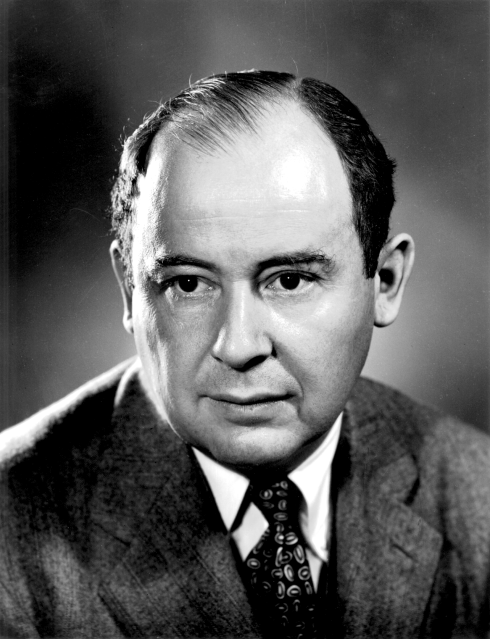
John von Neumann
The von Neumann architecture is named after John von Neumann, but don’t let that fool you: while he did design and publish the precursor to the architecture described on this page, most of von Neumann’s work was not in computing.
John von Neumann’s profile picture at Los Alamos National Laboratories circa 1940. Image hosted by Wikimedia
Von Neumann was born in Budapest in 1903 and was a child prodigy, learning five languages and studying history in his childhood and mathematics, chemical engineering, physics, and three more languages in college. He had published multiple major academic papers before turning 20 and had an academic job in Berlin when he was 25, where he averaged one major academic publication per month.
Von Neumann married at 26, moved to the USA at 29, divorced at 31, naturalized as a US citizen at 33, enrolled in the US army but was rejected because of his age, and remarried at 34. He told inappropriate jokes, always wore formal suits no matter the occasion, lived in one of the largest houses in the neighborhood and listened to energetic music so loud that it disturbed his neighbors. And he was an extremely productive scholar, with more than two dozen contributions at least as significant as the von Neumann architecture in mathematics, physics, economics, computer science, defense, and energy production.
The core elements of the von Neumann architecture are:
Input devices, such as keyboards and mice.
Output devices, such as screens and printers.
A Central Processing Unit (CPU) that consists of two integrated parts:
A control unit that decides what operations to do on what arguments when.
An Arithmetic Logic Unit (ALU) that does the computing work (arithmetic and logic).
A memory unit that stores information, including both instructions and data.
A diagram of the core elements of the von Neumann architecture. The input and output devices are draw as sending data to and accepting data from the CPU and memory grouping because some send or receive small data and interact with the CPU while others send or receive large data and interact with memory.
As computers have developed, many adjustments to this basic architecture have appeared, such as the difference between storage (long-term data that survives the computer turning off, typically organized as files on a disk) and memory (short-term data only used while the computer is running) and the addition of processors organized unlike the CPU such as Graphics Processor Units (GPUs).
1 ALU
The ALU is a machine that accepts three inputs and produces one output. Two of the inputs are numbers and the third is an operation. For example, given 3, +, and 4 it produces 7; given 102, /, 51 it produces 2; given 5, <, 3 it produces 0 (to represent false); and so on.
1.1 Simple ALU design
The simplest ALU is built like this:
Build a circuit that adds two numbers, and another that multiples two numbers, and another that divides two numbers, and so on for every operation you want to implement.
Send the two input numbers to all of those circuits at once.
Pick the result that matches the operation input.
This design is easy to build using just arithmetic circuits and multiplexers, and because all the operations happen in parallel it’s pretty fast. It does waste some power, but with a little extra circuity the circuits not needed for a given operation can have their inputs frozen to use less power.
1.2 Fast and slow instructions
The machinery for some operations, like division, takes much longer to arrive at an answer than for other operations, like addition. Since the computer is controlled by a single clock, that clock has to be slow enough for the slowest possible operation to avoid having some other operation give an incorrect result because its computation was cut off early.
A solution to this is to let some circuits take multiple clock cycles to complete. Instead of making a divider that computes a full division all at once we can make one that computes a few bits each clock cycle, taking (say) 15 cycles to finish a full division. We add to that circuit an output that says whether the answer is ready; if it is, the ALU sends it out and allows another instruction to enter but if it is not ready then the ALU waits, refusing new inputs until that changes.
1.3 Out-of-order operation
Computer code is typically provided as a list of instructions: do this, then do that, in order. But sometimes it is faster to do the instructions in a different order. Not all instructions can be safely reordered, but those without dependencies on one another can.
Suppose you were told to
Make lunch
Eat lunch
Wash the dishes
If you try to reorder these – say, by washing the dishes first – the end result will be visibly different.
But if you are told to
Make lunch
Call your mother
Wash the laundry
then you can reorder them without any impact on the final outcomes. You could also be given instructions that allow some, but not all, orders, such as
Make lunch
Eat lunch
Wash the laundry
The laundry item does not depend on the other two and can be freely moved before or between them, but the two lunch actions have a dependency between them and cannot be so moved.
Large, complicate, but high-speed ALUs have many parts which allow them to do operations out of order and to do multiple operations at the same time. The general design is as follows:
A component looks for dependencies in the raw instructions and creates variants that do the same work with those dependencies more explicit.
This step is called register renaming and is sometimes considered part of the control unit instead of the ALU.
Each instruction is placed in a queue (a small piece of memory with room for several instructions) attached to a functional unit, a circuit that computes one type of operations (just multiplications, for example).
Each functional unit checks its queue to see if there are any instructions ready to go (in the queue with their dependencies met).
If there is such an instruction, the instructional unit works on it, which may take one or several clock cycles.
A component takes the results of the functional units and translates them back into the form the programmer provided.
The hardware that does this step is called the reorder buffer and is sometimes considered part of the control unit instead of the ALU.
The end result is something like a large business: work orders come in, are read and routed to an appropriate department by the receiving department, are worked on by that department when they have time to do so, and are then packaged up and shipped off by a shipping department.
Out of order execution is fast when there are few dependencies in the instructions, allowing us to do many unrelated tasks at the same time; but it can also speed up instructions with dependencies by using speculation.
Speculation, also called speculative execution, has a functional unit start working on a task before the things in depends on are resolved by guessing (or speculating) on what they will be. If it turns out that we guessed correctly, we finish early; if not, we discard the speculative work and try again.
Suppose you’re helping a friend do their taxes. They sent you most of the information in advance, but didn’t tell you how many dependents they have.
If you decide not to speculate, you need to wait until they tell you and then do the taxes, finishing the taxes at (time they told you) + (time to do taxes).
If you decide to speculate, you guess a number (say, 0) and do the taxes based on that. When they tell you the correct number, you either got it right and are done, finishing at (time they told you); or you got it wrong and start over, finishing at (time they told you) + (time to do taxes).
Speculation can cost you extra energy, but it is never slower than not speculating and sometimes it gets the job done sooner.
Vulnerabilities caused by speculation
In 2017 and 2018, two major vulnerabilities (Spectre and Meltdown) were discovered that were based on out-of-order execution. A vulnerability is a feature of a computing system that can be used to bypass intended protections; code that uses the vulnerability in that way is called an exploit. Spectre allows creating exploits that peek past checks like passwords and Meltdown allows creating exploits where one program (such as an interactive web page) can access the data being used by a different program (such as another open web page, accounting software, or the like) without the other program’s knowledge or permission.
The key idea of both vulnerabilities is to have code that has a sequence of instructions; earlier instructions will stop the later ones from being run at all, but that’s not obvious up front to the out-of-order processor so it speculates by running them both at once and then discarding the later ones results based on the outcome of the earlier ones. All of that seems entirely correct; no problem so far.
The problem is that the act of doing the instruction that won’t be used has sideeffects. Most programs have patterns in how they do things and processors keep track of those patterns to try to speed up what will happen next. Spectre and Meltdown figured out clever instructions where the changes in the tracked patterns could be detected later and used to learn things about what the never-should-have-been-run instructions did.
The first workarounds to keep exploits based on these vulnerabilities from functioning do so by adding instructions (and thus time) that messed up the pattern tracking (and thus slowed down code). The patches that implemented this workaround did at least mostly resolve the vulnerabilities, but also noticeably slowed down any computer that applied them.
2 Control Unit
The control unit is a machine that has a counter (called the program counter (PC) or instruction pointer) that indicates where in memory the next instruction is found. It uses the value of that counter to retrieve the instruction from memory, parses out what the instruction is asking the computer to do, sends those actions to the ALU, and updates the counter to go to the next instruction next. Often the next instruction is the one after the current one in memory, but sometimes it is somewhere else entirely.
The control unit is also generally responsible for getting the values of operands and storing the results of computations in the correct places. And the line between modern control units and ALUs is not crisp, with things like the register renaming and reorder buffers (mentioned in the section on out-of-order operation) blurring the lines.
Modern control units often also have a component that translates the instructions stored in memory into an entirely different set of instructions, called micro-operations (µops). This translation provides backwards compatibility to programmers while allowing the hardware designers the freedom to change their design freely.
3 Memory unit
Von Neumann’s original design called for a memory unit that stored information for the computer, including both instructions and data. Architecturally, modern computers have split that into two components that are designed, positioned, and used in very different ways:
Memory, also called RAM (Random Access Memory), is fast, interacts directly with the CPU, and stores everything about currently-running programs.
Storage, also called disk based on a popular storage technology’s physical design, is vast, durable, and stores everything that will last after a program ends.
3.1 Memory
Memory is designed to be fast and quite large. It comes in several types:
DRAM (usually pronounced dee ram) uses capacitance to store bits, with one capacity and one transistor per bit.
Capacitance drains over time, and as small as the capacitors in DRAM are that’s just fractions of a second. So DRAM is always paired with a special processor that repeatedly loops over the memory, reading it and then re-writing it to renew the charge in the capacitor.
DRAM is compact, cheap, and low-energy and is the technology used for most of the memory in your computer.
Retrieving a value from or writing a value to DRAM typically takes around 100 nanoseconds, which is a few hundred CPU clock cycles.
SRAM (usually pronounced ess ram) uses six transistors to store each bit.
SRAM is much faster than DRAM, but is also less compact and more expensive, both in manufacturing cost and electricity used. SRAM is usually used to implement caches, which are small memory systems that store recently-used data for faster access.
Retrieving a value from or writing a value to SRAM typically takes a few nanoseconds, longer for larger SRAM chips, with small SRAM having around a 1-clock cycle access time and larger SRAM more like 10 CPU clock cycles.
Registers use over two dozen transistors to store each bit.
Registers are very fast, but expensive and power-hungry compared to SRAM or DRAM. Registers are used to store just a handful of values at a time, those currently being used in computation.
Retrieving a value from or writing a value to a register typically takes about 10 picoseconds, which is a small fraction of a CPU clock cycle.
The DRAM in a computer you purchase is generally advertised as simply the RAM, often measured in gigabytes (GB or GiB). Each program you run uses some RAM, and if the set of programs you have collectively exceed the RAM available then your computer becomes less responsive, especially when switching between programs. Some programs with very large memory needs, like some games and art programs, have coded in ways to run quickly with a lot of RAM or more slowly with less RAM, but that kind of design is relatively uncommon in general. Generally you either have enough and things are fast, or you don’t and they aren’t. Having more than enough has very little impact.
The SRAM in a computer may not be advertised at all, or may be advertised as the size of an L2 cache (or less often an L3 cache). SRAM size and speed can have a significant impact on overall performance, but its impact can be hard to predict from the advertised specifications alone.
The registers in a computer are not advertised, most of them being hidden inside the CPU and their exact number and arrangement often being a trade secret.
Gigabytes
A byte (B) is a number between 0 and 255. In English, one letter of text is one byte.
A kilobyte is either 1000 bytes (KB) or 1024 bytes (KiB), depending on which definition of kilo- is used. A printed page of text in common book formats is between 1.5 and 1.8 KiB.
A megabyte is either 1000 kilobytes = 1,000,000 bytes (MB) or 1024 kilobytes = 1,048,576 bytes (MiB), depending on which definition of mega- is used. Photographs and recorded songs are often a few MiB in size, depending on resolution/duration and file type.
A gigabyte is either 1000 megabytes = 1,000,000,000 bytes (GB) or 1024 megabytes = 1,073,741,824 bytes (GiB), depending on which definition of giga- is used. Movies are often around a GiB in size, depending on resolution, duration, and encoded quality.
Programs vary widely in size. For example, the program I am using to create this webpage is 15 KiB; the browser I am using to preview it is 288 MiB; and after running that browser for several days on hundreds of websites it is using 13.9 GiB of memory, mostly for copies of images on pages I’ve visited so that those pages can be reloaded quickly if I revisit them.
3.2 Storage
Storage is designed to be large and durable. Speed is a nice extra, but it is mostly extra; the common way to interact with storage is to load from storage to memory when a program starts and then run entirely in memory, only going back to storage when the user requests that something be saved.
There are many storage technologies, but two are common enough that you’re likely to encounter them:
Solid-state drives (SSD) use a technology called NAND flash to store data inside a silicon chip.
SSDs have three modes of operation:
Reading retrieves bits stored in the SSD. It typically takes about 1 millisecond to start reading and once it begins data arrives at a few hundred MiB per second, or around one byte every 10 CPU cycles.
Writing sets the bits in an erased part of the SSD. It takes about the same amount of time as reading.
Erasing takes a largish chunk of the SSD and erases its data, preparing it for later writing. It takes considerably longer than reading or writing, and also strains the SSD medium; each time it is erased it wears out a bit more until after a few thousand erasures they cannot be erased anymore and the SSD’s current contents become its permanent read-only contents thereafter.
Hard disk drives (HDD) use a stack of spinning circular platters with magnetic surfaces to store data. Mechanical arms with electromagnets on their tip both read and write data.
HDDs are much slower than SSDs, but do not have the same limit on their erasure count. Their speeds are also complicated, dominated by the time needed for the arm to swing to the right distance from the spindle the disk is spinning around following by the time needed for the platter to spin so that the right part is under the arm’s tip.
Most likely, you have SSDs as the storage medium in the electronics you commonly use, but may have HDDs in older computers, larger towers, or servers you access.
Because even fast storage is very slow compared to RAM, programs are sometimes designed to load only a small part of the entire program into RAM and then start running, loading the rest as the program runs. There are also programs that are not designed this way and have a lengthy loading period before they run.
4 Input and output devices
You are likely familiar with several input devices, such as
Keyboards
Touch screens
Mice
Cameras
Microphones
and also several output devices, such as
Screens
Printers
Speakers
There are also devices that serve as both input and output, such as
Bluetooth
Network cables
Wi-Fi antennas
USB cables
And these can be chained together in complicated ways; for example, you might have
a thumb drive (storage)
attached via a USB port (input and output)
to a keyboard (input)
attached via Bluetooth (input and output)
to a screen (output)
attached via a USB-C cable (input and output)
to a computer
That flexibility is enabled by standards that define rules for how a wide range of devices by any manufacturer should act so that all can be used together.
The particular standards that allow chaining of input and output devices are bus standards, which explain how different devices can share a communication channel (like a cable) and ensure the messages each one sends and receives reach the correct party in a way that the recipient can understand.
There are also many input devices that your computers use but which you likely don’t think about; for example
Battery charge sensors (for your information, and to trigger low-battery shutdown)
Temperature sensors (for controlling fans)
Accelerometers (to detect direction gravity is pulling, to orient your screen)
Light sensors (for adjusting screen brightness)
GPS receivers (to detect your location)
There are also computers installed in places and ways that are completely unlike those you think of as computers. You might have a computer controlling a robot, or detecting changes in tire pressure inside your car, or checking your I-card to the list of users allowed to access a building; these are generally full von Neumann-architecture computers differing from those in your laptop or phone primarily in being less powerful and in having a different set of input and output devices attached.